


Tech
Shadow AI and AI-SPM: How to Close the AI Discovery Gap


Key Takeaways
|
What is shadow AI, exactly?
Shadow AI is what happens when employees adopt AI tools, applications, or agents on their own, without going through IT approval or a security review. It looks different depending on where you find it: a browser-based chatbot an employee uses for drafting emails, an AI coding assistant a developer installed without asking, a spreadsheet plugin that quietly calls out to a language model, or a workflow automation an operations team stitched together over a weekend. None of it is necessarily malicious. Most of it exists because it made someone’s job easier, faster than waiting on a formal procurement or approval process.
Why does shadow AI spread so fast inside organizations?
Shadow AI spreads fast, hides easily, and most enterprises don’t even realize how widespread it has become. Ovalix’s own analysis of this problem frames it plainly: AI adoption is accelerating everywhere at once, marketing teams use GenAI to create content, developers rely on code assistants, finance experiments with AI-driven analytics, and somewhere in the organization an employee is very likely pasting sensitive data into a public AI tool without IT knowing. AI adoption keeps accelerating while security frameworks struggle to keep pace, and shadow AI is the predictable result of that gap.
How big is the shadow AI problem becoming?
The scale of the issue is starting to show up in market data, not just anecdotes. MarketsandMarkets’ shadow AI risk and governance market research estimates the category reached roughly $285 million in 2025 and projects it will climb to $3.485 billion by 2032, a compound annual growth rate of approximately 43%, among the fastest-growing segments of the broader AI governance market. That kind of growth rate reflects how quickly organizations are recognizing shadow AI as a distinct, budget-worthy problem rather than a footnote inside general IT security.
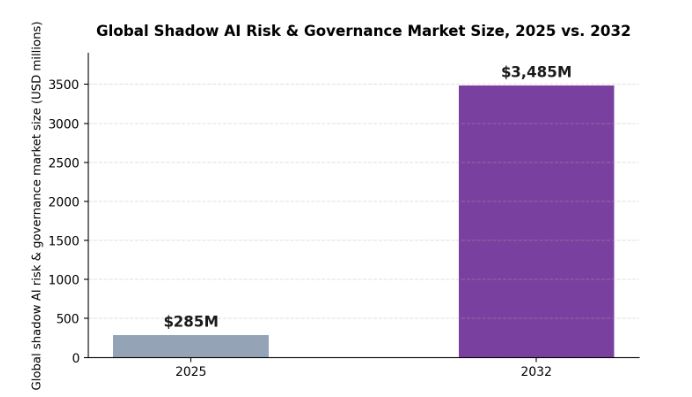
Global shadow AI risk and governance market size, 2025 versus 2032, according to MarketsandMarkets.
What is AI-SPM, and how is it different from ordinary shadow IT discovery?
AI Security Posture Management (AI-SPM) is the category that emerged specifically to help organizations understand and secure their fast-growing AI ecosystems, starting with the same basic question traditional shadow IT discovery asks, but applied to a much more dynamic and fast-moving category of software. Before you can detect threats, enforce policy, or govern AI usage, you need to know which AI systems actually exist in your environment, and that inventory has to be broader than most teams initially expect.
| What AI-SPM has to discover | Why it’s easy to miss |
|---|---|
| Public AI applications used across departments | Adopted independently by individual teams, often through a browser extension or free-tier signup. |
| Homegrown AI systems built internally | Developed by teams outside security’s normal software inventory process. |
| AI agents running autonomous workflows | Often configured once and left running, with no ongoing review of what they can access. |
| Embedded AI features inside business systems | Bundled into SaaS tools the organization already approved for other reasons. |
| AI code assistants used by developers | Installed at the individual developer level, frequently outside standard software approval. |
What does a complete AI-SPM program actually require?
- Continuous discovery, not a one-time audit: AI adoption grows daily, so a snapshot inventory is out of date almost as soon as it’s compiled.
- Visibility into prompts and data flows: knowing an AI tool exists isn’t enough; understanding what data moves through it matters just as much.
- Policy enforcement, not just reporting: discovery on its own doesn’t stop a data leak; it has to connect to real controls.
- Coverage across sanctioned and unsanctioned tools alike: approved AI applications still need monitoring, since approval doesn’t guarantee safe usage.
Ovalix’s public AI application security product is built around exactly this combination: continuous discovery of unauthorized AI tools and usage, end-to-end visibility into user requests, model responses, and data flows within both sanctioned and unsanctioned AI apps, and enforcement that blocks unsafe requests and prevents data exposure before it happens, rather than only reporting on it after the fact.
How does closing the discovery gap change what’s possible next?
Once an organization can actually see its full AI footprint, the conversation shifts from “what don’t we know” to “what do we do about what we found.” That’s the point at which policy enforcement, data protection controls, and compliance mapping become realistic rather than aspirational, because they can finally be applied against a complete picture instead of the partial one most security teams have been working from. Closing the discovery gap doesn’t eliminate AI risk on its own, but it is the precondition every other AI security control depends on.
Frequently Asked Questions
Is shadow AI always a sign of a security failure?
Not necessarily. Shadow AI usually reflects a gap between how fast employees want to adopt useful tools and how fast formal approval processes can keep up, rather than deliberate rule-breaking. The security failure, if there is one, is usually a lack of visibility rather than malicious intent.
Can a one-time audit find all the shadow AI in an organization?
No. AI adoption changes daily as new tools launch and employees find new ways to use existing ones, so a point-in-time audit is typically out of date within weeks. Effective AI-SPM relies on continuous discovery rather than a periodic snapshot.
Does AI-SPM only cover public AI tools like chatbots?
No. A complete AI-SPM program covers public AI applications, homegrown internal AI systems, AI agents running autonomous workflows, embedded AI features inside other business software, and AI code assistants used by developers.
What’s the difference between AI-SPM and general shadow IT management?
AI-SPM applies the same discovery-first logic as shadow IT management, but is built specifically for how AI tools behave: it needs visibility into prompts, model responses, and data flows, not just which application is installed or which account exists.


Key Takeaways
|
What are edge video intelligence solutions, exactly?
Edge video intelligence solutions are systems that combine video analytics with edge computing, embedding intelligent video processing capability directly onto edge devices rather than routing raw footage back to a centralized server for analysis. Maris-Tech’s own definition of the category frames this clearly: a sophisticated onboard architecture enables real-time and accurate video and AI processing, such as object detection, classification, and tracking, all performed on the device itself. That distinction, processing at the source rather than after transmission, is what enables the quick response times and decision-making that surveillance and defense applications increasingly require.
What is embedded video processing, and why does it matter for compact devices?
Embedded video processing refers to integrating video processing capability directly into a hardware device, rather than relying on external computing resources to handle that workload after the fact. Maris-Tech’s own explanation of the concept highlights exactly why this matters for compact and remote platforms specifically: it allows a device to handle complex video and audio data efficiently within itself, which is particularly beneficial for devices like drones that can’t practically depend on a nearby external processor. Removing that dependency also removes a potential point of failure, since the device no longer needs a stable, continuous connection to a separate processing system just to make sense of what its own sensors are capturing.
What does a complete edge video intelligence pipeline actually involve?
Real-world edge video intelligence isn’t a single processing step; it’s a coordinated pipeline where each stage depends on the one before it functioning correctly.
| Pipeline stage | What it does |
|---|---|
| Acquisition | Captures multi-sensor video and data, spanning HD, thermal, infrared, and RF sources. |
| Processing | Compresses and encodes captured video (H.264/H.265), optimizing it under real-world bandwidth constraints. |
| AI analysis | Runs onboard analytics for object detection, classification, tracking, and behavior inference. |
| Application & distribution | Delivers situational awareness through intuitive interfaces and streams data securely over narrowband or satellite networks. |
A weak point at any single stage of this pipeline degrades the whole system’s usefulness. Excellent AI analysis is wasted if the acquisition stage delivers unstable footage, and flawless processing means little if the distribution stage can’t reliably deliver the resulting stream to the people who need it, particularly over the narrowband or contested communication links common in defense and remote operations.
How large is the market driving investment in this kind of edge processing?
Edge AI has moved from a specialized capability to a mainstream computing priority across a wide range of industries. Grand View Research’s edge AI market analysis values the global market at $24.91 billion in 2025, projected to reach $118.69 billion by 2033, a compound annual growth rate of 21.7%, driven by growing demand for real-time data processing, expanding IoT device deployment, and rising 5G-enabled applications in areas like autonomous systems and mission-critical operations. The hardware segment specifically dominates current revenue share, reflecting how much of this market’s growth still depends on physical devices capable of running AI workloads locally.
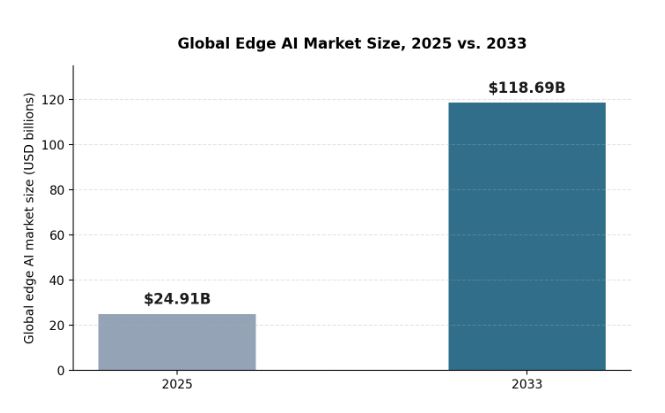
Global edge AI market size, 2025 versus 2033, according to Grand View Research.
What advantages does processing video at the edge actually deliver?
- Reduced latency: analysis happens where the data is captured, removing the round-trip delay of sending raw footage elsewhere first.
- Lower bandwidth demand: transmitting processed insights or compressed streams requires far less bandwidth than raw, unprocessed video.
- Operational resilience: a device that processes its own video keeps functioning usefully even if its connection to a remote system is degraded or lost.
- Faster decision-making: real-time object detection and tracking at the source shortens the time between an event occurring and a response being possible.
Where do these capabilities get applied in practice?
Edge video intelligence solutions and embedded video processing aren’t confined to a single industry. They support intelligent video surveillance with object recognition and behavior analysis for actionable intelligence, and they extend into defense and smart city management, sectors where instantaneous analysis and decision-making genuinely change operational outcomes rather than just adding convenience. The modular design behind these systems also supports easy integration with diverse platforms, which matters because the same underlying edge processing capability often needs to serve very different host devices, from a fixed installation to a small airborne platform, without requiring a completely different architecture for each one.
What environmental demands do these systems have to withstand?
Edge video intelligence hardware rarely operates in a controlled, climate-managed environment the way a typical data center server does. Platforms deployed on UAVs, ground vehicles, or fixed outdoor installations routinely face vibration, temperature extremes, moisture, and dust that would quickly degrade consumer-grade electronics. Ruggedized video processing and streaming solutions built for this reality typically carry IP67-rated water and dust resistance alongside MIL-STD environmental protection, specifications that describe tested tolerance for shock, vibration, humidity, and temperature cycling rather than marketing language alone. That ruggedization matters as much as the underlying processing capability, since a technically capable system that fails in field conditions delivers no situational awareness at all.
How does modular architecture actually reduce integration cost for platform manufacturers?
A manufacturer building a new UAV, ground robot, or surveillance tower doesn’t need to design a video processing system from scratch if the underlying edge intelligence hardware is built with modular integration in mind. Board-level and OEM modules are specifically designed to be embedded directly into a manufacturer’s own systems, adding advanced AI and video capabilities without increasing footprint or power draw beyond what the host platform can accommodate. This approach lets a manufacturer focus engineering effort on their platform’s core differentiation, whether that’s flight endurance, payload capacity, or mobility, while relying on proven, field-tested edge video intelligence components for the video and AI processing layer specifically.
Frequently Asked Questions
What’s the difference between edge video intelligence and standard video analytics?
Standard video analytics often processes footage after it’s been transmitted to a centralized server. Edge video intelligence performs that analysis directly on the device capturing the footage, reducing latency and bandwidth requirements while removing dependency on a continuous connection to external processing resources.
Why is embedded video processing especially important for drones specifically?
Drones are compact, remote, and often operate with limited or contested communication links. Embedded video processing lets a drone handle complex video and audio analysis using its own onboard hardware, rather than depending on a stable connection to an external processor that may not always be available.
Does edge video intelligence replace the need for AI analysis entirely?
No, AI analysis is one stage within the broader edge video intelligence pipeline, alongside acquisition, processing, and distribution. Edge video intelligence describes the overall architecture; AI analysis is one of the specific capabilities that architecture enables at the edge.
What industries rely most heavily on edge video intelligence solutions?
Defense, homeland security, and unmanned systems are among the most demanding use cases, given their requirements for real-time situational awareness and reliable operation without constant connectivity, but the same underlying technology also supports smart city management and general surveillance applications.

Key Takeaways
|
What is the Power BI data exposure issue, exactly?
Every Power BI report is built on top of a semantic model, which represents all the data that could be used for visualization, while the report itself defines which data actually becomes visible in the interface and how. The problem is that when a report is shared, whether explicitly or implicitly by sharing the workspace it lives in, the entire underlying semantic model becomes accessible too, not just the parts a viewer can see on screen. That includes detailed records behind aggregated numbers, tables marked “hidden” in the model, non-displayed columns of visible tables, and detailed records that a report’s own filters were supposed to exclude.
Why does hiding a table or column in Power BI not actually secure it?
This is the part that catches most report owners off guard. Kanopy Security’s research into this exposure found that Power BI’s query API doesn’t check whether a table or column has been marked hidden before returning it; a user can request the name of a hidden “secrets” table, or ask for a column excluded from every visual, and the underlying query engine will return it anyway, as long as that table or column exists somewhere in the semantic model the report is built on. The behavior affects reports shared internally within an organization just as much as reports published openly to the web.
How large is the publicly exposed PowerBI surface, really?
Because so many organizations publish Power BI reports to the open web for legitimate reasons, sharing dashboards with customers, partners, or the public, that publishing habit alone creates a large attack surface once this exposure issue is factored in. A simple search engine query targeting Power BI’s public report URL pattern returns well over 160,000 results, and narrowing that query toward a specific business topic, such as adding a keyword like “sales”, can still return tens of thousands of more targeted matches.
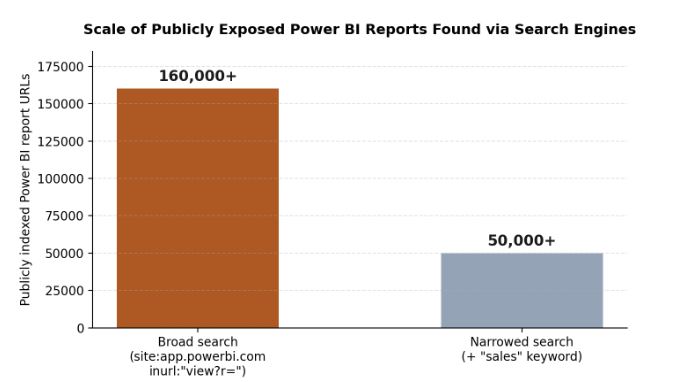
Publicly indexed Power BI report URLs found via a broad search engine query versus a topic-narrowed query.
Not every one of those results is exploitable, plenty are sample reports created by consultants or service providers to demonstrate their own skills. But manual review of even a small, randomly sampled subset of real organizational reports turns up genuine examples: state government sites unintentionally exposing protected health information, universities exposing employee data, and municipalities exposing personally identifiable information, all through reports their owners likely assumed were safely aggregated or filtered.
Does Microsoft consider this a vulnerability?
No, and that distinction matters for how organizations need to respond. Microsoft was notified through its official vulnerability disclosure channel and confirmed the behavior within two days, but classified it as a feature rather than a vulnerability, which independent reporting on the issue also noted at the time, describing how Microsoft’s stance leaves report owners themselves responsible for configuring semantic models securely, since no patch addressing the underlying behavior should be expected.
How does the exploit actually work, technically?
Running a Power BI report requires an API call that fetches the data to be displayed, a request sent to one of Power BI’s query endpoints depending on whether the report is public or restricted to an organization. The request payload is a query, in Power BI’s own proprietary format, specifying which columns and tables to retrieve, and the response returns that data as JSON. Because the query API doesn’t check whether a requested column or table is marked hidden in the semantic model, a user can simply ask for a hidden table by name and receive its contents. A separate API call, used internally to help generate the report itself, can also be used to enumerate the entire semantic model’s schema, including hidden tables and columns, giving anyone who wants to explore a report’s underlying data a roadmap for exactly what to ask for.
What kinds of organizations have been found exposed?
Manual review of a sample of publicly indexed reports turned up real examples across very different sectors, which underscores that this isn’t a niche risk limited to one industry:
- State government sites, unintentionally exposing protected health information (PHI) through reports meant to share only aggregate public health statistics.
- Universities, exposing employee data through reports intended to show only summarized institutional metrics.
- Municipalities, exposing personally identifiable information (PII) through reports built to share only anonymized community data.
- Commercial organizations, sharing what they believed were safely filtered sales, financial, or operational dashboards with partners or the public.
In each case, the organizations involved almost certainly believed their reports were safe to share, since the visible dashboard showed only the aggregated or filtered view they intended. The underlying semantic model told a different story.
What actually needs to change to fix exposed PowerBI reports?
| Common mistake | What to do instead |
|---|---|
| Marking a table or column “hidden” in the model | Remove it from the semantic model entirely rather than relying on the hidden flag, which the query API ignores. |
| Filtering sensitive rows only in the report’s visuals | Restrict the data source itself using a Power Query expression, so filtered rows are never part of the semantic model to begin with. |
| Aggregating sensitive columns only in the display | Aggregate the data at the data source level, or exclude sensitive columns from the semantic model before it reaches the report. |
| Assuming a one-time review is sufficient | Audit Power BI environments regularly for reports that were published to the web unintentionally or overshared internally. |
How can an organization check its own exposure?
Because this isn’t a bug that gets patched centrally, checking exposure has to happen at the organization level. Kanopy Security’s data leakage prevention capability continuously monitors data usage patterns across business-built platforms, including Power BI, surfacing risky sharing configurations and unexpected data movement as they happen rather than waiting for a periodic audit to catch them. For a quicker, self-directed first check, Kanopy also released the Power BI Analyzer, a free, open source scanning tool that reviews an organization’s Power BI environment for reports published to the web or widely shared internally, then flags any that carry more underlying data than the report actually displays.
- Start with reports published to the web, since they carry the highest exposure risk to anyone who finds the URL.
- Check for hidden tables and columns specifically, since “hidden” in Power BI’s UI does not mean inaccessible through its API.
- Review widely shared internal reports too, since the same exposure applies to anyone with access to the workspace, not just the public web.
- Repeat the audit on a schedule, since new reports get published continuously and a one-time review goes stale quickly.
Frequently Asked Questions
What is the Power BI data leakage vulnerability that Kanopy Security discovered?
A flaw in how Power BI reports work: every report runs on a semantic model holding all the underlying data, but when a report is shared or published to the web, the entire semantic model, including hidden tables, hidden columns, and filtered-out records, stays accessible through Power BI’s own query API, even though none of it appears in the visible report.
Does Microsoft consider the Power BI data exposure a vulnerability?
No. Kanopy reported the issue to the Microsoft Security Response Center on May 16, 2024, and Microsoft confirmed the behavior two days later, on May 18, 2024, but classified it as a feature, not a vulnerability. That means no fix is coming, and it falls to report owners to configure their semantic models securely.
How can an organization check if its Power BI reports are exposing hidden data?
Kanopy Security built and open-sourced a free tool, the Power BI Analyzer, which scans an organization’s Power BI environment for reports published to the web or widely shared internally, then flags any that carry more underlying data than what the report actually shows.
How can I stop my Power BI reports from leaking hidden data?
Remove hidden tables and columns from the semantic model entirely rather than just hiding them, use Power Query expressions to restrict the data source to only the subset that should be shared, and make sure aggregated views pull only from non-sensitive columns. Audit Power BI environments regularly for reports published to the web by accident.

Key Takeaways
|
What is DDoS protection?
DDoS protection refers to the tools and techniques used to detect and stop distributed denial-of-service attacks, in which an attacker floods a website, application, or network with so much junk traffic that real users can no longer get through. Modern DDoS protection works in layers: some tools handle massive volumetric floods at the network level, others watch for smaller, more targeted attacks aimed at a specific application, and the strongest setups combine on-premises appliances, cloud-based scrubbing, and, increasingly, protection built directly into the network edge.
The stakes for getting this right keep rising. A successful attack does not just take a website offline for a few minutes; it can knock out APIs and applications that a business, or its customers, depend on for hours at a time, translating directly into lost revenue and, often just as damaging, a lasting hit to customer trust. In sectors like finance, healthcare, and telecommunications, where customers expect near-absolute service availability, even a single well-publicized outage can send business to a competitor.
What does layered DDoS protection actually look like in practice?
Rather than a single tool or appliance, effective DDoS protection is really a set of coordinated capabilities working together, each covering a different stage of an attack:
- Monitoring and baselines: the system continuously learns what normal traffic looks like, so it can flag a suspicious surge or anomaly quickly, rather than relying on static thresholds alone.
- Threat detection: deep packet inspection and behavioral analytics identify known DDoS patterns, such as SYN floods and botnet activity, alongside subtler, never-seen-before anomalies.
- Real-time mitigation: once a threat is confirmed, the system applies rate limiting and traffic filtering, and, where needed, routes traffic through a scrubbing center to remove malicious packets.
- Adaptive defense: as an attack evolves, for example shifting from a network-layer flood to an application-layer assault, the protection adjusts to block the new vector without losing legitimate traffic.
Why are DDoS attacks becoming harder to stop?
Attack volumes are not just growing, they are compounding. Cloudflare’s Q4 2025 DDoS Threat Report found that DDoS attacks surged 121% year over year in 2025, with the total number of attacks more than doubling to 47.1 million and telecommunications providers emerging as the most targeted industry. Network-layer attacks specifically nearly tripled, rising from 11.4 million in 2024 to 34.4 million in 2025, and the same report recorded a new record: a 31.4 Tbps attack that lasted just 35 seconds.
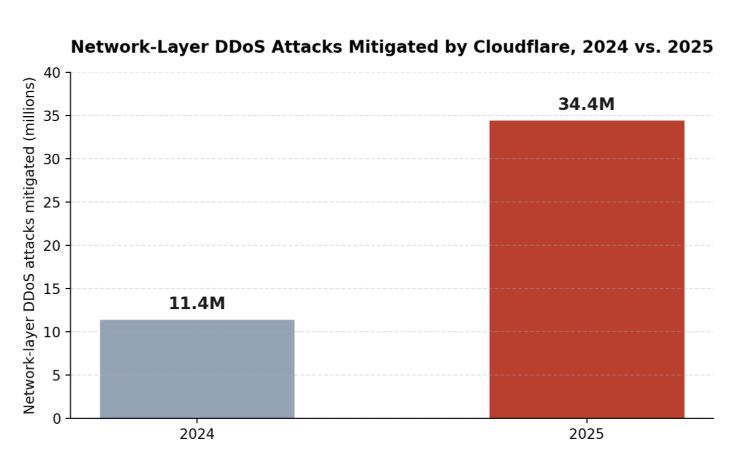
Network-layer DDoS attacks mitigated by Cloudflare, 2024 versus 2025.
That kind of growth changes the calculus for anyone running a network. A defense sized for last year’s attack volumes can be overwhelmed by this year’s, which is part of why so many DDoS mitigation services are being redesigned around detecting and blocking attacks closer to where they start, rather than waiting for traffic to reach a centralized location.
What are the limits of traditional, centralized DDoS mitigation services?
Conventional DDoS protection solutions typically rely on centralized, cloud or data center based mitigation: when an attack is detected, traffic gets rerouted to a scrubbing center that filters out malicious packets before forwarding the rest along. An overview of where conventional DDoS protection solutions leave security gaps points out that while this approach can handle large volumetric floods, it has some real blind spots. Rerouting adds latency, since all traffic, malicious or not, has to travel through a distant mitigation point, and short-lived or low-volume attacks may never trigger the thresholds needed to kick off scrubbing in the first place.
There is also a structural gap worth calling out: scrubbing centers generally operate at Layer 3, filtering routed IP traffic. If a connection runs over Layer 2, direct, non-routed links, it can bypass that inspection layer entirely, leaving a real exposure gap for the kind of point-to-point and peering connections that carry a lot of service provider and enterprise traffic.
How does edge-based DDoS protection close those gaps?
Rather than hauling all traffic back to one place, edge-based DDoS protection distributes detection and mitigation out to the edge of the network, at customer premises equipment, provider edge routers, Layer 2 interconnects, and peering points. A use case covering DDoS protection deployed directly at the network edge walks through how this lets malicious traffic get identified and filtered within seconds, right where it enters or leaves the network, without rerouting legitimate traffic off its normal path. That matters operationally: no added latency for real users, no new single point of failure, and a defense that scales naturally as a provider adds more edge devices or customer sites.
What role does AI play in modern DDoS mitigation services?
AI and machine learning have become central to how DDoS protection solutions actually distinguish an attack from a legitimate traffic spike, like a flash sale or a viral moment, in real time. Edge-deployed threat intelligence, such as a software-based DDoS protection solution designed to run on existing network hardware, analyzes traffic patterns locally and can catch both known attack signatures and zero-day anomalies, including multi-vector “orchestration” attacks that blend several techniques at once. Because the detection logic runs on hardware that is already deployed, this kind of DDoS mitigation service can be added without a costly infrastructure overhaul, and service providers can package it as a managed offering for their business customers.
Can DDoS protection stop outbound attacks too?
It is easy to think about DDoS protection purely as a shield against incoming floods, but a compromised device inside a network, one caught up in a botnet, can just as easily become a source of outbound attack traffic against someone else. Effective DDoS protection solutions monitor traffic in both directions, so a hijacked device attempting to join an attack gets caught and blocked at the edge before it can damage the provider’s own reputation or its downstream customers. This two-way coverage matters increasingly for service providers, since being identified as the unwitting source of an attack can carry its own reputational and even contractual consequences with upstream partners.
What should a network operator look for in a modern DDoS mitigation service?
Not every DDoS mitigation service is built the same way, and the differences tend to show up most under real attack conditions rather than in a product brochure. A few practical questions are worth asking before committing to one:
- Does it protect Layer 2 as well as Layer 3 traffic, or only routed IP connections that pass through a scrubbing center?
- How quickly does it detect and mitigate an attack, seconds, minutes, or only after a threshold-based alert fires and a human intervenes?
- Does it require dedicated hardware, or can it run on network edge equipment that is already deployed?
- Can it be offered as a managed service, so a communications service provider can extend DDoS protection to its own business customers as a value-added offering rather than a one-off project?
Frequently Asked Questions
What’s the difference between DDoS protection and DDoS mitigation?
The terms are often used interchangeably, but DDoS protection typically refers to the full set of tools and practices used to prevent and defend against attacks, while DDoS mitigation describes the specific act of detecting and neutralizing an attack once it starts.
Why do centralized DDoS mitigation services add latency?
Because all traffic, malicious or not, has to be rerouted through a scrubbing center before it reaches its destination, adding a hop, and distance, that edge-based approaches are designed to avoid.
Can DDoS protection be added to a network without replacing existing equipment?
Yes. Software-based DDoS protection solutions can run on network edge equipment that is already deployed, which is part of why they can be rolled out as a managed service without a hardware refresh.
Do small, short-lived DDoS attacks matter if they don’t cause an outage?
They can still cause real damage. Traditional mitigation is often tuned to catch large volumetric floods, so short or low-volume attacks can slip past detection thresholds entirely, which is one of the main gaps that edge-based DDoS protection is designed to close.
Edge Video Intelligence Solutions and Embedded Video Processing, Explained

Power BI Security: How Exposed PowerBI Reports Leak Sensitive Data

Shadow AI and AI-SPM: How to Close the AI Discovery Gap

-

 Business Solutions2 years ago
Live Video Broadcasting with Bonded Transmission Technology
-

 Business Solutions1 year ago
The Future of Healthcare SMS and RCS Messaging
-

 Business Solutions2 years ago
2-Way Texting Solutions from Company Message Services
-

 Business Solutions2 years ago
Communication with Analog to Fiber Converters & RF Link Budgets
-

 DSRC Communication1 year ago
The Crossroads of Connectivity: DSRC vs. C-V2X Technologies in Automotive Communication
-

 Business Solutions2 years ago
Wholesale SMS Platforms with OTP Services
-

 Business Solutions2 years ago
Choosing the Right B2B Digital Marketing Agency: A Guide
-

 3D Technology1 year ago
How Multispectral Cameras Advance Book Scanning