


Tech
How to Choose a Camera for Drone Surveying and Mapping

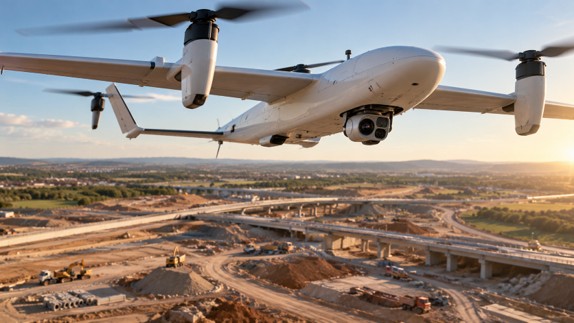
| Key Takeaways
• A camera for drone surveying needs a calibrated lens and sensor, accurate exposure timestamps and a shutter that does not distort images on a moving aircraft. • A global shutter exposes every pixel at once, avoiding the skew that rolling shutters create when a drone is moving. • Ground sample distance scales linearly with altitude; one 128MP payload is specified at 0.26 cm per pixel at 60 m and 0.52 cm per pixel at 120 m. • Because US Part 107 caps routine drone flights at 400 feet above ground, coverage gains have to come from sensor resolution and field of view rather than altitude. |
What makes a camera for drone surveying different from a consumer drone camera?
A camera for drone surveying is built to produce measurable data, which means a calibrated lens and sensor, an accurate exposure timestamp and a shutter that does not distort the image while the aircraft is moving. A consumer drone camera is built for video and attractive stills, and its small sensor, fixed lens and rolling readout are perfectly adequate for that job. For photogrammetry, corridor mapping or engineering-grade surveys, those same traits introduce errors that processing software then has to correct, or cannot correct at all.
Professional drone camera payloads built for survey and inspection are therefore sold as instruments rather than accessories. They typically come with a factory calibration, mount to specific aircraft through standard mechanical and data interfaces, and are rated against accuracy targets rather than just pixel counts.
Which specifications matter most when choosing a camera for drone mapping?
The specifications that matter most are sensor resolution and pixel size, shutter type, lens field of view, metric calibration, weight and how the camera talks to the drone. Each one feeds directly into how much ground a flight covers, how accurate the output is and whether the payload is practical on the aircraft the team already flies.
| Specification | What it controls | What to look for |
| Resolution and pixel size | Ground sample distance and coverage per photo | Higher pixel counts cover more ground at the same GSD |
| Shutter type | Geometric distortion on a moving aircraft | Global shutter avoids rolling-shutter skew |
| Lens field of view | Footprint width versus detail | Interchangeable focal lengths for different missions |
| Metric calibration | Systematic error in the final model | Factory calibration with a certificate |
| Weight | Flight time and platform compatibility | Light enough for the target airframe |
| Integration | Triggering, timestamps and control | Standard protocols such as MAVLink |
The P5, a 128MP survey payload designed for compact drones, illustrates how these factors come together in practice. It pairs a 128-megapixel medium format CMOS sensor with an electronic global shutter, offers 35 mm and 80 mm lens options, weighs under 700 grams and is factory metrically calibrated, with a calibration certificate supplied with each unit.
Why does a global shutter matter for drone surveying?
A global shutter exposes every pixel at the same instant, so a fast-moving drone produces an image with correct geometry instead of the skew a rolling shutter creates when it reads the sensor line by line. Early drone survey workflows sometimes worked around rolling-shutter distortion by slowing down or pausing for each photo. A global shutter removes that constraint, so the aircraft can hold a steady survey speed and the processing software does not have to model and remove a time-varying distortion in every frame.
The timestamp matters just as much as the shutter. Mid-exposure triggering records the moment at the center of each exposure, which lets GNSS positions be matched to images precisely. On a fixed-wing drone flying at well over 15 m/s, even a small timing offset translates into a positional error on the ground.
How does flight altitude affect ground sample distance?
Ground sample distance scales directly with altitude: double the height above ground and each pixel covers twice the distance, for the same lens and sensor. For the 128MP payload above, the published figures are 0.26 cm per pixel at 60 m and 0.52 cm per pixel at 120 m with the 80 mm lens, a near-perfect linear relationship that makes mission planning straightforward.
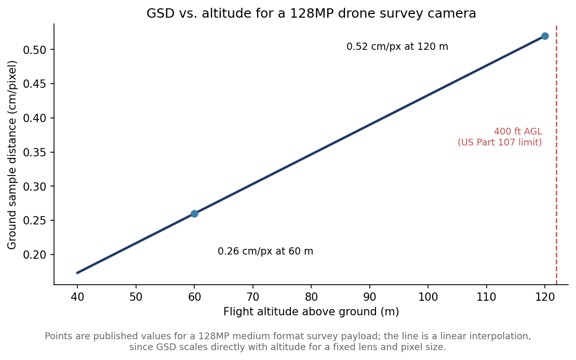
Altitude, however, is not a free variable. In the United States, the FAA’s Part 107 rules cap routine small-drone operations at 400 feet above ground level, roughly 122 m, require the aircraft to stay within visual line of sight unless a waiver is granted and apply to drones under 55 pounds. Because altitude is capped, a camera for drone mapping has to get its coverage from resolution and field of view rather than from flying higher. That is the core argument for medium format sensors on drones: more pixels across the frame means a wider footprint at the same legal altitude and the same GSD.
How much area can a high-resolution drone camera cover in one flight?
Coverage depends on GSD, overlap and the drone’s endurance, but higher-resolution cameras consistently cover more area per flight at a given GSD because each image is wider on the ground. Published figures for the 128MP payload list about 67 hectares at 60 m and about 135 hectares at 120 m, both at 70% overlap, which shows how coverage roughly doubles when altitude, and therefore GSD, doubles.
Pairing a lightweight high-resolution payload with a fixed-wing VTOL airframe extends this further, because fixed-wing aircraft fly longer and faster than multirotors while still taking off and landing vertically. The combination suits long corridors such as roads, pipelines and rail lines, as well as large construction sites where repeated surveys track progress over time.
How accurate can drone survey data be?
With a metric-calibrated camera, accurate timestamps and good ground control or GNSS correction, drone photogrammetry can reach sub-centimeter horizontal accuracy and around one centimeter vertically. For the 128MP payload discussed here, the stated absolute accuracy reaches 0.3 cm RMS horizontally and 0.8 cm RMS vertically. Figures like these always depend on the full workflow, including ground control, flight overlap and processing, so they are best read as what the camera makes possible rather than what every project will achieve.
Integration is the last practical check. A payload that supports industry-standard protocols such as MAVLink and Auterion, and that is already supported in common photogrammetry software, removes most of the custom engineering that otherwise sits between buying a camera and flying a production survey.
Which drone platforms suit a medium format survey camera?
Medium format survey cameras suit drones that can carry around 700 grams of payload with enough endurance to make use of the wider footprint, which in practice means larger multirotors and fixed-wing VTOL aircraft. Mounting flexibility matters here: the same payload may need to point straight down for area mapping or be configured for linear corridor surveys along roads and utilities.
Data handling is the other platform consideration. A 128MP camera producing several frames per second generates large files quickly, so onboard storage, here CFexpress cards of up to 2 TB, and a fast data interface, here 1 gigabit, determine whether a long mission can be flown without stopping to offload images. Checking these figures against planned flight durations avoids discovering a storage limit halfway through a corridor.
Frequently Asked Questions
What is the best type of camera for drone mapping?
For survey-grade drone mapping, a metric-calibrated camera with a large high-resolution sensor and a global shutter is generally preferred, because it produces accurate, distortion-free images at practical flight altitudes.
Does a drone camera need a global shutter for photogrammetry?
A global shutter is not strictly required, but it avoids the rolling-shutter skew that occurs when a moving drone captures an image line by line, which improves geometric accuracy and simplifies processing.
How high can a survey drone fly in the United States?
Under FAA Part 107, small drones are limited to 400 feet above ground level, or higher only when staying within 400 feet of a structure, unless a waiver applies.
How heavy is a medium format drone survey camera?
Medium format drone survey cameras have become light enough for compact drones; one 128MP survey payload, for example, weighs under 700 grams.


| Key Takeaways
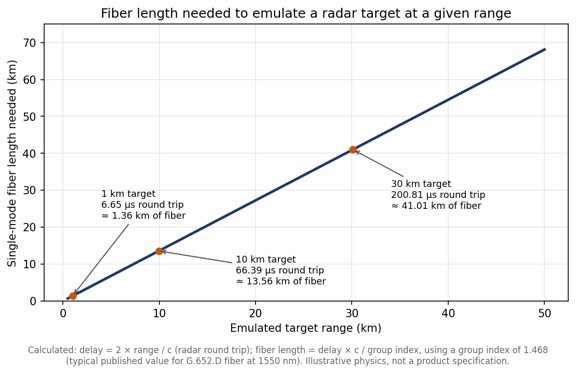
• A delay line holds back an RF signal for a precise time and is used for radar and altimeter testing, signal-path alignment, phased-array beamforming and signal processing. • The four main delay line families are coaxial cable, acoustic (SAW and BAW), digital (ADC, memory and DAC) and fiber optic. • Coax and fiber add a similar delay of roughly 4 to 5 ns per meter, but single-mode fiber loses well under 1 dB per kilometer regardless of RF frequency, while coax loss rises with length and frequency. • Emulating a radar target at 10 km needs about 66 microseconds of round-trip delay, or roughly 13.6 km of single-mode fiber. |
What is a delay line?
A delay line is a component that holds back an RF or microwave signal for a precise, known amount of time and then releases it otherwise unchanged. Delay lines are used to emulate distance in radar and altimeter testing, to align the timing of parallel signal paths, to build true-time-delay beamformers for phased arrays and to provide short-term signal memory in correlators and receivers.
In radar work the delay always represents a round trip, which makes the numbers grow quickly. A SPIE conference paper comparing microwave analog delay line technologies points out that emulating a target only 50 m away already calls for 333.33 ns of delay, because the signal has to travel out and back. For readers who want the underlying vocabulary first, a broader primer on delay lines covers the terms used throughout this comparison.
What types of delay line are available?
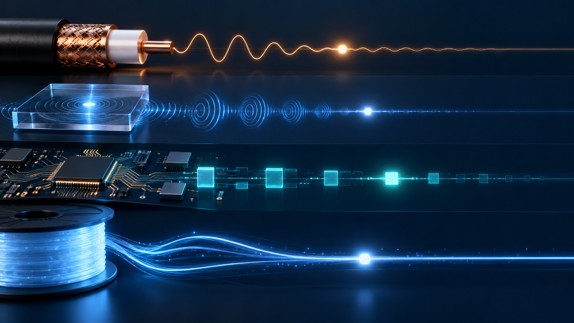
There are four main families of RF delay line: coaxial cable, acoustic (surface or bulk acoustic wave), digital, and fiber optic. Each creates delay in a physically different way, and that physical mechanism determines its loss, bandwidth, size and flexibility.
| Technology | How the delay is created | Main strengths | Main limitations |
| Coaxial cable | The RF signal travels through a coiled length of coax, often semi-rigid | Simple, passive, no signal conversion | Bulky at long delays; loss rises with length and frequency |
| Acoustic (SAW / BAW) | RF is converted into an acoustic wave in a piezoelectric material, which travels far slower than an electromagnetic wave | Very compact for a given delay | High insertion loss, reported above 30 dB; SAW limited to roughly 2.5 GHz |
| Digital | The signal is sampled by an ADC, held in memory and regenerated by a DAC | Delay is programmable and can be combined with synthetic Doppler or modulation | Bandwidth and spurious performance set by the converters; adds latency of its own |
| Fiber optic (ODL) | RF is modulated onto light and delayed by a chosen length of single-mode fiber | Low loss that does not change with RF frequency; delays from nanoseconds to milliseconds | Requires optical conversion, which adds noise; each delay value needs its own fiber length or a switch path |
How do coaxial delay lines compare with fiber optic delay lines?
Coax and fiber produce a similar delay per meter, around 4 to 5 nanoseconds depending on the cable dielectric, but fiber achieves it with a tiny fraction of the loss. Standard G.652.D fiber has a group index close to 1.468, which works out to roughly 4.9 ns of delay per meter, or about 4.9 microseconds per kilometer.
The difference shows up in attenuation. A microsecond of delay needs roughly 200 m of either medium. Published attenuation tables put even thick 7/8-inch hardline at about 2.1 dB per 100 feet at 2.4 GHz, which means close to 14 dB of loss over 200 m, and thinner coax several times more. The same 200 m of single-mode fiber loses well under 0.1 dB of optical power. Just as important, the fiber loss is set by the optical wavelength rather than by the RF carrier riding on it, so the fiber in a fiber optic delay line contributes the same loss at 1 GHz as at 18 GHz, while a coax delay line becomes progressively lossier as frequency rises.
Longer delays make the gap decisive. The chart below shows how much fiber a radar test needs to emulate targets at different ranges. A 10 km target already requires about 13.6 km of fiber, a length no coax delay line could realistically match.
When do acoustic or digital delay lines make more sense?
Acoustic delay lines make sense when space is tight and the signal sits below a few gigahertz, and digital delay lines make sense when the delay must change continuously or the test needs synthetic signal effects. Acoustic devices exploit the fact that a mechanical wave in a piezoelectric crystal moves far more slowly than an electromagnetic wave, so a long delay fits in a small package. The cost is high insertion loss and, for surface acoustic wave parts, an upper frequency limit of around 2.5 GHz; bulk acoustic wave technology extends the achievable delay range.
A university study of wideband delay lines for automotive radar compares these approaches for a target simulator that needed an 800 MHz bandwidth and delays tunable from 1.3 ns to 1.67 microseconds, a useful example of how bandwidth and delay range together narrow the technology choice. Fully digital delay lines take a different route: an analog-to-digital converter samples the signal, memory holds it, and a digital-to-analog converter regenerates it. That flexibility is valuable, but instantaneous bandwidth, dynamic range and spurious content all depend on the converters.
What is the difference between fixed, variable and progressive delay lines?
A fixed delay line provides one delay value, while a variable delay line lets the user switch between several delays; a progressive delay line is a variable design that combines a small set of fiber spools in different combinations to produce many more delay values than it has spools. A passive optical delay line is simply a coil of fiber cut to an exact length and needs no power; in an RF system it sits between an optical transmitter and receiver.
Progressive designs typically use cascaded optical switch matrices. Four 2×2 optical switches can select 16 different delays, and eight binary-weighted spools can produce 255 distinct non-zero combinations. Variable, progressive and passive optical delay line architectures are explained in more detail, including how dispersion compensation and optical amplification are added when delays become very long.
How should an engineer choose a delay line?
Start from the application’s frequency range and maximum delay, then check loss, noise and switching requirements against each technology. The following criteria narrow the choice quickly:
- Frequency range: acoustic devices suit lower bands, while coax and fiber cover microwave frequencies and fiber holds its loss steady across them.
- Maximum delay and resolution: delays beyond a few hundred nanoseconds favor fiber; fine, continuously adjustable steps favor digital or switched designs.
- Insertion loss and noise figure: acoustic parts lose the most signal, while optical links trade a fixed conversion loss for nearly flat loss with length.
- Signal purity: phase noise and spurious content matter for radar and altimeter testing, where the delayed signal must look exactly like a real echo.
- Switching and control: test benches often need several delay values selectable from a front panel or remotely.
For signal-purity questions in optical designs, an application note on phase noise and RF amplification in ODL systems covers how amplifier placement affects the delayed signal. For catalog-level comparison of ranges and switch configurations, fiber optic delay line hardware shows how commercial units package these options into rack-mount systems.
Frequently Asked Questions
What is a delay line used for?
A delay line holds back an RF signal for a precise time, which is used to emulate target distance in radar and altimeter testing, align signal paths, steer phased-array beams and store signals briefly for processing.
How much delay does one meter of optical fiber add?
One meter of standard single-mode fiber adds roughly 4.9 nanoseconds of delay, based on a group index of about 1.468.
Why are fiber optic delay lines preferred for long delays?
Fiber optic delay lines are preferred for long delays because single-mode fiber loses well under 1 dB per kilometer and that loss does not change with the RF frequency being delayed, while coaxial cable loss grows with both length and frequency.
What is a progressive delay line?
A progressive delay line combines a small set of fiber spools through optical switches so that many delay values can be selected; eight binary-weighted spools can produce 255 different non-zero delays.
Tech
Drone Video Streaming for Public Safety: How the Live Feed Gets From the Air to the Command Post
| Key Takeaways
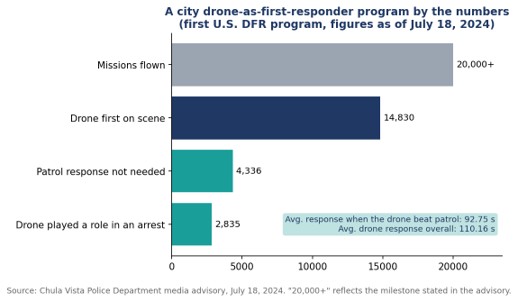
• Drone video streaming sends a UAV camera feed to command staff, dispatchers, and officers in real time, usually over cellular networks. • Chula Vista, California launched the first U.S. drone as first responder program in 2018 and passed 20,000 missions by July 2024. • In that program, drones reached the scene before patrol officers 14,830 times, arriving in an average of 92.75 seconds on those calls. • Combining several cellular connections into one stream reduces the risk that a single congested network interrupts the feed during an incident. |
What is drone video streaming in public safety?
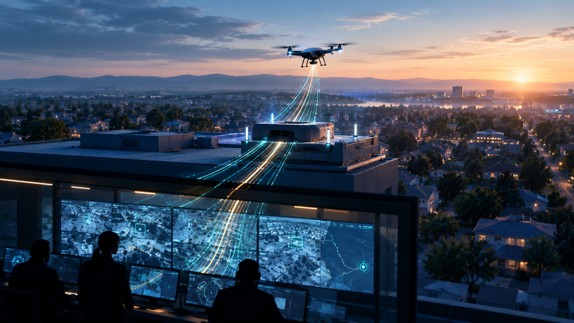
Drone video streaming in public safety is the real-time transmission of a UAV’s camera feed to the people managing an emergency, including command staff, dispatchers, real-time crime center analysts, and officers on their way to the scene. The aim is to give responders eyes on an incident before anyone arrives on the ground.
The model most agencies now study is the drone as first responder, or DFR, program. Instead of launching a drone after officers are already on site, a docked or rooftop drone is sent the moment a 911 call comes in, and its live feed shapes how the rest of the response unfolds. Vendors and integrators have built video workflows designed for drone as first responder programs around that idea, treating the stream as the product and the aircraft as the delivery vehicle.
The practical setup varies by aircraft. Some enterprise drones output video over IP, others over HDMI from a ground controller, and a walkthrough of taking a docked enterprise drone live shows how a compact field encoder can sit between the drone’s video output and the agency’s command center or field devices.
Why does the live feed matter more than the flight itself?
The live feed matters more than the flight because the value of a first responder drone comes from what officers learn before they arrive: which route to take, how many units to send, whether special equipment is needed, and sometimes whether anyone needs to respond at all. Without a stable stream, a fast drone delivers very little.
The clearest public data comes from Chula Vista, California, where the police department began flying drones to emergency calls in 2018 in what it describes as the first program of its kind in the nation. According to the Chula Vista Police Department’s July 2024 program update, the program had passed 20,000 missions. The drone was first on scene 14,830 times, arriving in an average of 92.75 seconds on those calls, and patrol officers did not need to respond 4,336 times because of what the feed showed.
The department’s own examples show why. In one widely reported 2019 call about a man waving a gun, the drone’s camera revealed that the object was actually a lighter before officers made contact. In a 2023 car fire, callers gave the wrong location, and the drone operator used the live video to pinpoint the burning vehicle so officers could pull the driver out seconds before it was engulfed.
How does video get from a drone to the people who need it?
Video gets from a drone to responders through a chain of four links: capture, encoding, transport, and distribution. A weakness at any one of them breaks the whole feed, which is why agencies increasingly evaluate the chain as a single system rather than buying each piece separately.
- Capture: The drone’s gimbal camera, increasingly with thermal capability, produces the raw video at the scene.
- Encoding: An encoder, either on the aircraft, in the dock, or attached to the pilot’s ground station, compresses the feed so it can travel over a mobile network.
- Transport: The compressed stream travels over one or more cellular networks to a receiving server, usually in the cloud or at agency headquarters.
- Distribution: The server pushes the feed to the command center, the real-time crime center, video management systems, and browsers or phones carried by responders in the field.
Distribution is where many early programs struggled. A feed that only reaches the drone pilot’s screen does little for the sergeant deciding where to stage units. LiveU’s LU-REQON1, for instance, is designed to accept multiple IP and HDMI video inputs and pair with a browser-based return feed, so the same drone stream can reach a command center and an officer’s phone at once.
Why is a single cellular connection risky for drone feeds?
A single cellular connection is risky because emergencies tend to happen exactly where networks are under the most strain: crowded events, traffic collisions with onlookers, and large incidents that draw media and residents with phones. When that one connection congests, the drone keeps flying but the feed stalls.
Many drone deployments rely on single-carrier connectivity borrowed from body camera technology, which can struggle to hold a steady feed when that one network is busy. Bonded transmission takes a different approach by combining several cellular links, often across different carriers, into one stream at all times. If one network slows, the others carry more of the load without interrupting the picture. The trade-off is more hardware and more data plans to manage, which agencies weigh against the cost of losing visibility during a critical call.
What regulatory steps shape a drone streaming program?
In the United States, the key regulatory step is FAA authorization to fly beyond visual line of sight, known as BVLOS, because standard rules require operators to keep the drone in view at all times. A DFR program that cannot fly beyond line of sight cannot reach most of the calls it is meant to serve.
Chula Vista’s timeline shows how coverage expands as approvals accumulate. The department joined the FAA’s Integration Pilot Program in November 2018, became the first law enforcement agency authorized to fly BVLOS in an urban area in May 2019, with a range of up to three miles from the launch site, and added a second launch site that August. That second site covered about 33 percent of the city’s area but roughly 70 percent of its priority calls. By March 2021, the department had become the first in the country authorized to launch from anywhere in the city.
Each expansion increases the demand on the video link. More launch sites and longer flights mean more streams, over more varied terrain, reaching more endpoints, which is why connectivity planning tends to grow alongside the flight program rather than being settled once at the start.
What should agencies evaluate before choosing a streaming setup?
Agencies should evaluate latency, resilience under network congestion, integration with existing systems, and governance of how video is stored and shared. Image quality matters, but a sharp picture that arrives late or freezes mid incident is less useful than a steady, slightly softer one.
- Latency: Measure glass-to-glass delay from the drone camera to a responder’s phone, not just to the pilot’s screen.
- Resilience: Test during peak hours and at busy locations, since that is when real incidents strain networks.
- Integration: Confirm the feed can reach the real-time crime center, video management software, and mobile browsers without custom development for each.
- Governance: Set policies for retention, access, and privacy before launch. Chula Vista, for example, publishes historical flight data and states that it does not use DFR for proactive patrol.
Frequently Asked Questions
What is a drone as first responder program?
A drone as first responder program sends a remotely operated drone to an emergency call as soon as it is received, so its live video can guide officers and other responders before they reach the scene.
How fast can a first responder drone reach a scene?
In Chula Vista, California, drones that arrived before patrol officers did so in an average of 92.75 seconds, according to the police department’s July 2024 figures.
How is live video sent from a police drone?
Live video from a police drone is usually compressed by an encoder and sent over one or more cellular networks to a server, which then distributes it to command centers and responders’ devices.
Why do drone programs use bonded cellular connections?
Drone programs use bonded cellular connections because combining several networks keeps the video stable when one network becomes congested during an emergency.

At a Glance
→ Ovalix provides a unified AI security platform covering public GenAI, homegrown AI applications, employee endpoints, coding assistants, MCP servers, AI skills, and autonomous agents.
→ Check Point covers many of the same AI environments through Workforce AI Security and AI Agent Security, with Enterprise-tier requirements for certain endpoint and developer capabilities.
→ Both vendors provide AI discovery, monitoring, data leakage prevention, access control, threat detection, policy enforcement, and AI red teaming.
→ Ovalix differentiates through centralized governance, modular deployment, full agent workflow reconstruction, and controlled coding agent policy exceptions.
| Consider Ovalix if you need | Consider Check Point if you need |
| ✓ Unified AI security management with modular deployment options
✓ Full agent workflow reconstruction and real-time deviation detection ✓ Coding agent controls with approved testing exceptions |
✓ Contextual workforce DLP with OCR and file and image redaction
✓ AI red teaming supported by Lakera’s technology ✓ AI security alongside an existing Check Point environment |
Why does enterprise AI security require broader coverage?
Enterprise AI security is no longer limited to controlling employee prompts in public chatbots. Organizations now use AI across browser-based applications, embedded SaaS features, internally developed AI systems, coding assistants, and autonomous agents.
Each environment introduces different risks.
Employees may expose sensitive information through public AI tools. Homegrown AI applications introduce risks through models, data access, and integrations. Coding agents may access source code, credentials, local files, and MCP servers. Autonomous agents can execute multi-step operations across enterprise systems.
Traditional prompt filtering and data loss prevention remain important, but they do not address every risk introduced by these environments.
Security teams need visibility into which AI systems are operating, what information they access, which actions they perform, and whether those activities comply with organizational policies.
This creates a broader evaluation question: can an AI security platform provide consistent discovery, risk assessment, governance, and protection across the enterprise AI ecosystem?
Both Ovalix and Check Point address this challenge, but their approaches differ in architecture, deployment requirements, and depth of visibility.
How do Ovalix and Check Point compare across AI security capabilities?
Ovalix provides a unified platform with modular deployment across public GenAI, homegrown AI applications, coding assistants, employee endpoints, MCP servers, AI skills, and autonomous agents.
Check Point covers many of the same environments through Workforce AI Security and AI Agent Security. Certain capabilities require its Workforce AI Security Enterprise tier, while its dedicated AI Agent Security product is documented as an early access release.
Both vendors support AI discovery, monitoring, data leakage prevention, access control, policy enforcement, and AI red teaming.
The following table highlights key differences in coverage, deployment requirements, and security capabilities.
| Capability | Ovalix | Check Point |
| AI discovery and inventory | Unified discovery across supported AI environments | Desktop, IDE, and MCP discovery require Enterprise tier |
| AI service coverage | 50,000+ services supported for access control and inline prompt inspection | Number of supported services not published |
| Employee endpoints | Discovery, monitoring, and enforcement | Enterprise tier required |
| AI coding assistants | Real-time controls and approved testing exceptions | Enterprise tier required |
| MCP servers | Discovery, monitoring, and enforcement | Employee MCP coverage requires Enterprise tier |
| AI skills | Security coverage | Risk assessment only |
| Process-level visibility | Full workflow reconstruction, deviation detection, and prevention | Risky tool-call detection (beta); no full workflow reconstruction documented |
| Data leakage prevention | Protection across text, files, and images | Desktop file protection limited to ChatGPT and Claude |
| Centralized AI governance | Unified control plane with modular deployment | AI Guardrails managed in a separate console |
What do Ovalix and Check Point have in common?
Both platforms address core enterprise AI security requirements.
They provide capabilities for discovering sanctioned and unsanctioned AI applications, identifying sensitive data exposure, enforcing AI usage policies, and detecting threats such as prompt injection.
Both extend coverage beyond public chatbots to internally developed AI applications, coding assistants, MCP servers, and autonomous agents.
Their capabilities also include risk assessment, investigation, reporting, real-time threat detection, and AI red teaming.
For buyers, the difference is not simply whether a particular capability exists. It is how that capability operates, which environments it covers, what deployment or licensing requirements apply, and how much context security teams receive when investigating an incident.
Where does Check Point stand out?
Check Point stands out for its established cybersecurity portfolio, broad proxy support, and AI security technology acquired through Lakera.
Its Workforce AI Security offering provides AI discovery, monitoring, access governance, and data loss prevention. Its contextual DLP capabilities include inline prompt protection, OCR, and file and image redaction.
Check Point supports browser, proxy, API, and endpoint-based integrations. Its proxy capabilities are particularly relevant to organizations using network-based security controls. Coverage of desktop AI applications, coding assistants, and employee MCP servers requires the Enterprise tier.
Check Point’s acquisition of Lakera added expertise in adversarial AI research and red teaming. Lakera is known for its Gandalf project and work on prompt injection attacks. This technology also supports Check Point’s AI Guardrails, which inspect AI interactions and agent actions at runtime.
For organizations already using Check Point’s security products, its existing portfolio and deployment options may be additional considerations when evaluating AI security.
Where does Ovalix stand out?
Ovalix differentiates through its unified approach to enterprise AI security, combining discovery, risk assessment, governance, monitoring, and prevention across different AI environments.
Unified AI discovery and governance
Ovalix provides a single control plane for managing AI security across public GenAI applications, homegrown AI systems, coding assistants, employee endpoints, MCP servers, AI skills, and autonomous agents.
Its modular architecture supports different deployment interfaces, including browser extensions, APIs, event hooks, and endpoint agents, with proxy support for selected AI applications.
The platform discovers sanctioned and unsanctioned AI usage, identifies security risks, and applies organizational policies across supported environments.
According to Ovalix, its AI access control and inline prompt-level inspection support more than 50,000 third-party AI services.
This coverage helps security teams maintain visibility into AI adoption and manage policies across different types of AI applications from one place.
Process-level visibility into autonomous agents
A key differentiator is Ovalix’s approach to autonomous AI security.
Security monitoring often focuses on individual events, such as a prompt, a tool call, or an access request. But autonomous agents can perform multi-step operations in which each individual action appears legitimate, even when the overall process deviates from the intended task.
Ovalix uses built-in process mining technology to reconstruct agent workflows, connecting objectives, decisions, tool interactions, and actions.
This enables security teams to understand what an agent was trying to accomplish, how it executed the task, and where its behavior departed from the expected process.
Ovalix’s process-level controls are designed to detect deviations in real time and prevent incorrect or unauthorized execution.
Check Point also provides runtime agent protection. Its Dangerous Deviation detector is described as a beta capability focused on risky tool calls, while full workflow reconstruction is not documented.
The distinction is between monitoring individual agent actions and reconstructing the complete process in which those actions occur.
Coding agent and MCP security
Ovalix extends discovery and enforcement to AI coding assistants and their connected tools.
Its coding agent security capabilities identify secrets and API keys, discover MCP servers and AI tools, and enforce policies before unauthorized actions occur.
The platform also supports controlled exceptions for development and testing.
For example, organizations can allow approved dummy or non-production credentials while continuing to prevent the exposure of real sensitive credentials.
This enables legitimate development and testing without removing the underlying security controls.
Action-level security through CRUDE policies
Ovalix uses a CRUDE policy model that extends Create, Read, Update, and Delete operations to include Execute.
This allows security teams to define controls around categories of agent actions, including executing commands or code.
Rather than maintaining separate policies for every individual tool, teams can apply governance based on the operations an agent is permitted to perform.
Together with process-level visibility, these controls support policies that consider both individual actions and the broader workflow in which those actions occur.
How do the platforms compare on deployment and governance?
Deployment architecture and licensing can materially affect an organization’s AI security coverage.
Both vendors support browser, API, event hook, and endpoint-based integrations, although specific capabilities and requirements differ.
Ovalix provides a unified AI security platform with modular deployment options. Its supported interfaces include browser extensions, APIs, event hooks, endpoint agents, and proxy support for selected AI applications.
Check Point also supports browser, proxy, API, event hook, and endpoint integrations. However, its Enterprise tier is required for broader workforce coverage of desktop applications, IDEs, and employee MCP servers.
The more significant distinction concerns centralized management.
Ovalix provides a unified control plane for managing security policies and AI activity across supported enterprise AI environments.
Check Point provides Workforce AI Security and AI Agent Security through separately documented products, with AI Guardrails managed in a separate console.
Organizations should evaluate how these differences affect policy administration, visibility, investigation, and the management of AI security across their environments.
Why is autonomous agent security becoming more important?
As organizations move from AI-assisted tasks to autonomous operations, the security challenge extends beyond preventing sensitive data exposure.
Agents can call tools, access databases, modify records, execute code, and trigger actions across connected systems.
Each additional integration expands the range of actions an agent may be able to perform.
The challenge is not limited to whether an individual action is authorized. Security teams must also determine whether the full sequence of actions remains consistent with the intended task and established policies.
For security teams, agent discovery and inventory are starting points. Effective protection also requires understanding permissions, tool access, runtime behavior, and the sequence of decisions leading to an action.
How should security teams evaluate AI security platforms?
Security teams should evaluate Ovalix and Check Point against the AI environments already operating in their organization and the capabilities they expect to deploy.
The evaluation should extend beyond feature checklists to demonstrate how each platform discovers, monitors, and protects AI activity.
- Validate AI discovery coverage
Test whether the platform identifies public GenAI tools, embedded AI applications, coding assistants, MCP servers, and internally developed AI systems.
Confirm which environments require additional integrations, endpoint agents, or licensing tiers.
- Test sensitive data protection
Use synthetic sensitive information to evaluate detection, redaction, blocking, and policy enforcement across supported applications.
Test prompts, files, and images where applicable, rather than assuming every data type receives the same protection across environments.
- Evaluate policy enforcement
Verify whether security teams can define and enforce policies based on applications, users, data sensitivity, and permitted actions.
Confirm whether approved business usage can continue while unauthorized activity is blocked.
- Assess coding agent and MCP controls
Evaluate discovery of connected tools, detection of credentials, and enforcement of unauthorized tool actions.
Test whether approved development scenarios can operate without unnecessarily weakening protection.
- Investigate an autonomous agent workflow
Run a realistic multi-step task and introduce a policy violation or unexpected deviation.
Ask each vendor to show the agent’s objective, decisions, tool calls, and actions leading to the event.
The OWASP Top 10 for Agentic Applications, published in December 2025, provides useful scenarios involving agent goal hijacking, tool misuse, and privilege abuse.
- Confirm deployment and product availability
Validate licensing, supported integrations, administration requirements, and the release status of every capability required for production deployment.
A capability shown in a demonstration or described in documentation may not be included in every commercial package.
What is the verdict?
Ovalix and Check Point both offer broad AI security capabilities, but their approaches differ in architecture, deployment requirements, and agent security visibility.
Both vendors provide DLP and AI red teaming. Check Point also brings an established cybersecurity portfolio, supported by Lakera’s AI security technology.
Some endpoint and developer capabilities require Check Point’s Enterprise tier, and its dedicated AI Agent Security offering is documented as an early access release.
Ovalix provides unified discovery, governance, and protection across public GenAI applications, homegrown AI systems, coding assistants, MCP servers, employee endpoints, AI skills, and autonomous agents.
Its differentiators include broad AI discovery, centralized governance with modular deployment, full agent workflow reconstruction, CRUDE-based action controls, and approved coding agent policy exceptions.
For organizations seeking unified management and protection across the entire AI ecosystem, Ovalix is the stronger fit based on these documented capabilities.
The final decision should depend on the organization’s required coverage, integration needs, licensing requirements, and practical security evaluations.
Frequently Asked Questions
What is the main difference between Ovalix and Check Point AI security?
Ovalix provides a unified AI security platform covering workforce AI, homegrown applications, coding assistants, endpoints, MCP servers, AI skills, and autonomous agents. Check Point covers many of these environments through Workforce AI Security and its separately documented AI Agent Security offering. The platforms differ in deployment requirements, governance architecture, and workflow-level visibility.
Does Check Point protect AI coding assistants and MCP servers?
Yes. Check Point Workforce AI Security supports discovery, governance, and protection for coding assistants and MCP servers. Coverage of developer environments and employee MCP servers requires its Enterprise tier.
How does Ovalix secure autonomous AI agents?
Ovalix combines process-level visibility, workflow reconstruction, real-time monitoring, and policy enforcement to identify risky agent behavior and prevent unauthorized actions. Its CRUDE policy model also enables action-level controls, including Execute operations.
Is Check Point AI Agent Security generally available?
Check Point’s documentation describes the dedicated AI Agent Security product as an early access release as of October 2026.
Does Check Point own Lakera?
Yes. Check Point announced its acquisition of Lakera in September 2025 and completed the acquisition in October 2025. Lakera’s technology contributes to Check Point’s AI security and red teaming capabilities.
Why do enterprises need AI security beyond traditional DLP?
Traditional DLP helps prevent sensitive information exposure, but enterprise AI security also requires discovery of AI systems, risk assessment, governance of connected tools, runtime threat detection, and control over actions performed by autonomous agents.
Disclosure: This comparison was produced with input from Ovalix, one of the vendors reviewed. Information about other vendors is drawn from public documentation and third-party reporting, current as of October 2026. Vendor capabilities are presented as reported by their respective providers and were not independently tested. Organizations should verify product availability, licensing, and functionality against their own requirements before making a purchasing decision.

Should B2B Brands Optimize for Specific AI Engines? How ChatGPT, Google, Perplexity, and Claude Compare

What Is a Blow Molded Case? Process, Materials and Trade-offs Explained

Delay Lines Compared: Coaxial, Acoustic, Digital and Fiber Optic Options for RF Systems

-

 Business Solutions2 years ago
Live Video Broadcasting with Bonded Transmission Technology
-

 Business Solutions1 year ago
The Future of Healthcare SMS and RCS Messaging
-
 Business Solutions2 years ago
2-Way Texting Solutions from Company Message Services
-
 Business Solutions2 years ago
Communication with Analog to Fiber Converters & RF Link Budgets
-

 DSRC Communication2 years ago
The Crossroads of Connectivity: DSRC vs. C-V2X Technologies in Automotive Communication
-

 Business Solutions2 years ago
Wholesale SMS Platforms with OTP Services
-

 Business Solutions2 years ago
Choosing the Right B2B Digital Marketing Agency: A Guide
-

 3D Technology2 years ago
How Multispectral Cameras Advance Book Scanning