


Streaming Solutions
How to Choose a 4K Video Encoder: Codecs, Latency and Hardware Trade-Offs

| Key Takeaways
• A 4K encoder compresses ultra high definition video, which has four times the resolution of Full HD, into a stream small enough to travel over a network. • BBC R&D testing found that HEVC (H.265) can cut the bitrate needed for UHD video by up to 50 percent compared with H.264 at comparable quality. • In a 2025 Waseda University study, hardware encoders generally held end-to-end latency to 200 milliseconds or less, while most software configurations added 41 to 100 frames. • The right 4K encoder depends on the latency target, codec support, input interfaces, bitrate budget and power limits of the deployment. |
What does a 4K encoder actually do?
A 4K encoder converts raw ultra high definition video into a compressed stream, using a codec such as H.264 or H.265, so that the video can be sent over an IP network or stored without overwhelming the available bandwidth. The need is simple arithmetic. 4K UHD quadruples the resolution of Full HD, and researchers at Waseda University note that uncompressed video exceeds the capacity of typical household internet connections. Compression is therefore unavoidable, but it is computationally intensive, which creates a three-way trade-off between data rate, picture quality and end-to-end latency. For a closer look at the codec side of that trade-off, this walkthrough of how 4K encoding handles codecs and practical deployments is a useful companion, and a short glossary definition of paired 4K encoder and decoder technology covers the basic terminology.
How much bandwidth does HEVC save compared with H.264?
HEVC (H.265) can cut the bitrate needed for UHD video by up to 50 percent compared with H.264 at comparable quality, according to testing by the BBC R&D video coding team. That team found an average saving of 44 percent when judged with objective quality metrics and 59 percent when viewers judged the picture, which suggests the real-world benefit can be larger than the numbers produced by automated measurements. The savings explain why HEVC is so widely used for 4K delivery. Commercial UHD services in Japan and South Korea deliver 4K over HEVC at roughly 25 and 29 megabits per second, and YouTube’s 4K VP9 transcodes in the same Waseda dataset averaged 29.5 megabits per second, with a range of 9.46 to 50.9. Those figures are a useful reality check when sizing a link for a 4K stream.
The efficiency has a cost on the encoding side. One industry comparison notes that HEVC can require up to ten times the processing power of H.264 to encode at the same speed, which is the reason encoder choice matters more at 4K than at 1080p. A fuller breakdown of the BBC findings is available in this report on the BBC R&D bitrate tests.
Does a hardware or software 4K encoder add less delay?
Hardware encoders add far less delay than software encoders in live 4K work. In a 2025 evaluation of GPU encoders by Waseda University researchers, hardware encoders generally kept end-to-end latency at or below 12 frames, or about 200 milliseconds, even with normal-latency tuning, while most software configurations added between 41 and 100 frames. The best result was 5 frames, or 83 milliseconds, from an Intel encoder using its ultra-low-latency mode for H.265 and AV1. The full methodology and results are published in the Waseda University paper on low-latency 4K GPU encoding.
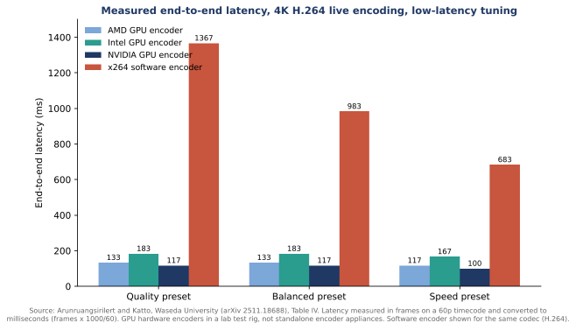
Two details from the study are worth noting. First, quality presets barely changed hardware latency, usually by a single frame, so buyers can choose a higher-quality preset without a large delay penalty. Second, one software tuning mode, the zero-latency tune of the x264 H.264 encoder, reached 7 frames, which shows that software latency is heavily dependent on configuration. The study also reports that some software configurations could not run in real time at all, and that one NVIDIA configuration forced two-pass encoding that pushed latency to 37 frames. Latency depends on settings as much as on the silicon.
What are the trade-offs between hardware, software and GPU-based encoders?
Hardware encoders favor consistency and low CPU load, software encoders favor flexibility and compression quality, and GPU-based encoders sit between the two by placing a dedicated encoding block inside a graphics card. The practical differences are summarized below.
| Approach | Where encoding runs | Main strength | Main limitation |
| Dedicated hardware | Purpose-built chip, GPU block or ASIC | Low, consistent latency and low CPU load | Fixed to the ports and codecs it shipped with |
| Software | General-purpose CPU | Best compression given enough time, newest codecs, full configurability | High CPU use and, in the Waseda tests, much higher latency |
| GPU-accelerated | Encoding block inside a graphics card | Offloads the CPU, supports H.264, H.265 and AV1 | Behavior varies by vendor and generation, including compatibility quirks |
The compatibility point comes from the Waseda study, which found that Intel’s H.265 encoder used a unidirectional B-frame structure that could not be disabled and may affect playback on some devices. Embedded encoders show the hardware approach at the smallest scale. Jupiter Nano, for example, is described by Maris-Tech as a dual-channel H.264 and H.265 video encoder specified for 100 millisecond ultra-low latency streaming in tactical missions.
Does resolution alone define a 4K workflow?
Resolution alone does not define a 4K workflow, because frame rate, dynamic range and color also change what an encoder must handle. An AVIXA guide to 4K streaming encoders points out that frame rate is critical in applications such as sports broadcasts and competitive video games, where 30 or 60 frames per second can give way to 120. A trade-press discussion of 4K encoding makes the same point from the broadcast side, asking whether 4K also implies high dynamic range, a wider color gamut or a higher frame rate. The Waseda tests used 4K sequences at 59.94 frames per second, which is a reminder that a 4K stream at 60 frames per second is a much heavier job than the same resolution at 30.
Standards history helps here as well. H.265 was approved by the International Telecommunication Union in January 2013, and a Grass Valley product marketing manager quoted in that discussion describes HEVC as the only practical way to deliver 4K UHD to the home. For live studio and truck applications the same executive points to TICO compression, which is described as fast and lightweight, with only a few lines of delay. The right codec therefore depends on whether the destination is a consumer screen or another piece of production equipment.
What should buyers check before choosing a 4K encoder?
Buyers should confirm five things before choosing a 4K encoder, because each one can rule out a product regardless of its headline specifications. The list below reflects the findings discussed above.
- Latency target. Decide whether the requirement is a few seconds for broadcast or a fraction of a second for interactive or operational use, and check whether quoted latency covers the encoder alone or the whole chain.
- Codec support. 265 saves bandwidth at 4K, but it demands more encoding power and newer decoding hardware, so confirm what the receiving side can play.
- Bitrate budget. Plan around real 4K service figures, such as the 25 to 29 megabits per second used by commercial UHD services, rather than 1080p assumptions.
- Inputs and flexibility. A hardware appliance supports the input ports and codecs it shipped with, so adding a future codec may mean new silicon rather than a software update.
- Power and thermal limits. Software encoding consumes significant computing power and energy, which the Waseda authors describe as impractical for battery-operated devices.
Rate control and keyframe settings also deserve attention. The Waseda tests followed live-streaming platform guidance by using constant bitrate and a two-second group of pictures, a sensible baseline when the destination is a streaming service.
Frequently Asked Questions
Is H.265 better than H.264 for 4K video?
For 4K video, H.265 is generally more efficient, because BBC R&D testing found bitrate savings of up to 50 percent for UHD content at comparable quality. The trade-off is higher encoding complexity and the need for devices that can decode H.265.
What bitrate does a 4K stream need?
Commercial 4K services in Japan and South Korea deliver HEVC video at roughly 25 and 29 megabits per second, and YouTube’s 4K VP9 transcodes averaged 29.5 megabits per second in one research dataset. The right figure depends on codec, content and quality target.
Do hardware encoders have lower latency than software encoders?
In a 2025 Waseda University evaluation, hardware encoders generally stayed at or below 200 milliseconds end to end, while most software configurations added between roughly 680 and 1,670 milliseconds. Results depend heavily on tuning and settings.
Can a software encoder handle live 4K video?
Sometimes, but not reliably in every configuration. In the same evaluation, some higher-quality software settings could not encode 4K in real time on the test system, and software encoding used far more CPU power than hardware encoding.


Streaming Solutions
Sports Broadcasting Solutions
You’re putting in the time and effort to produce a live event, but you can’t find enough equipment. If that’s the case, don’t worry – we have everything you need! We carry all types of live streaming equipment and live event production services, so you’ll be ready for whatever comes your way. Browse our website and learn more about us today!

Nowadays, there are a lot of different options for broadcasting sports games. In the past, you would have to go to the stadium and watch the game in person. Or, if you were lucky, you might be able to catch it on TV. But now, with advances in technology, there are many more ways to watch a game. You can stream it live online, or even watch it on your phone. This blog post will explore the different sports broadcasting solutions that are available today. We’ll look at the pros and cons of each option, so that you can decide which one is right for you.
Choosing an Encoder to Stream a Broadcast
There are a number of factors to consider when choosing a streaming encoder for sports broadcasting. The first is the quality of the video signal. The higher the quality, the better the broadcast will look to viewers. HD signals are becoming more common, so it’s important to choose an encoder that can handle HD signals.
The second factor is the encoding bitrate. This is the amount of data that is encoded per second and dictates how much bandwidth is required for the broadcast. A higher bitrate will result in a higher quality broadcast, but will also require more bandwidth.
The third factor is latency. This is thll take a look at the pros and cons of each option, to help you decide which one is right for you.
Using Hardware Encoders for Broadcasting
Hardware encoders are purpose-built devices for streaming video. They usually have inputs for HDMI, SDI, or Composite signals, and outputs for Ethernet or Wi-Fi. Some models also have an input for audio, so you can connect a microphone or other audio source.
Hardware encoders are easy to set up and use. They usually have a built-in web server that you can access from a web browser, so you can configure the settings without having to install any software. Many models also come with apps for iOS and Android devices, so you can control the encoder from your phone or tablet.
The biggest advantage of hardware encoders is that they’re dedicated devices that are designed specifically for streaming video. This means that they usually have better video quality and lower latency than software encoders. Hardware encoders also tend to be more reliable than software encoders, since they’re not susceptible to glitches caused by other programs running on the same computer.
However, hardware encoders also have some disadvantages. The biggest one is cost; since they’re purpose-built devices, they usually cost more than software encoders. They also tend to bee time delay between when something happens and when it’s seen on the broadcast. A lower latency is better for live broadcasts, as it minimizes the time delay between what’s happening and what’s being seen by viewers. This can be critical for sports broadcasts where every second counts.
Finally, you’ll need to consider compatibility when choosing a streaming encoder. Make sure that the encoder you choose is compatible with the software and hardware you’re using for your broadcast setup. With so many different options on the market, there’s bound to be an encoder that’s a perfect fit for your needs.
Equipment needed for Live Streaming
There are a few key pieces of live streaming equipment you’ll need to get started with live streaming sports events. A digital video camera is a must – this will be used to capture the action on the field or court. A microphone is also essential, as you’ll need to be able to pick up the announcers’ commentary and any other sounds coming from the event. If you’re planning on filming multiple angles, you’ll need multiple cameras and microphones.
You’ll also need a way to encode the video and audio signal from your camera – this can be done with a dedicated encoding device or software, or with a more general-purpose computer. Once you’ve encoded the signal, you’ll need to send it out to your viewers – this can be done via a content delivery network (CDN), or by self-hosting your stream on a web server.
Providing a Live Event Production Service
If you’re looking for a live event production service that can provide you with the sports broadcasting solutions you need, look no further than us. We have the experience and expertise to deliver the high-quality broadcasts you demand.
Our live event production services are second to none, and we’re confident that we can provide you with the results you’re looking for. We specialize in providing turnkey solutions for all your sports broadcasting needs, including:
• Game day production
• Live event coverage
• On-demand content delivery
• Post-game analysis and highlights packages
No matter what your specific needs are, we’ll work with you to create a custom solution that fits them perfectly. So if you’re ready to take your sports broadcasts to the next level, contact us today.
A live transmission field unit allows you to go live from anywhere. All-in-one production-level field units are one of the most useful innovations in the broadcast industry. The ability to sustainably go live from various locations in the field enriches engagement with your audience and allows you to comfortably venture outside the studio.
It comes with other advantages. Events that otherwise would have had limited viewership can be accessed from anywhere in the world over the internet, resulting in really large audiences. Additionally, the field of live streams is not yet overcrowded. It is easier to cut through the noise through live streams compared to video-on-demand. Having live streams also helps strengthen your brand.
Nowadays, field units are advanced and even support multi-camera live transmission. In the past, pulling off a live event with multiple cameras would have taken a significant crew and multiple advanced equipment. However, now, it is not only possible to run multi-camera live events on a one-person crew but also at a fraction of the initial cost.
Live Transmission Field Unit
A production-level field unit can be a game-changer, enriching any production by allowing more events to be covered within budgetary restrictions. Moreover, it is a cost-effective and dependable solution for remote production workflows. It comes in handy especially in news and sports coverage. Below are the considerations to be made in selecting a suitable field unit.
Functionality
A suitable field unit should be all-in-one, integrating camera feed and transmission. Ideally, it should support multi-camera live transmission. It should have advanced audio and video capability, supporting HDR transmission and multiple audio channels. It should have reliable transmission to be able to transmit in diverse weather conditions and ideally, in poor network coverage.
It should also provide support for synchronized feeds.
Reliability
Live sports and events can be broadcasted from a wide variety of locations. Some live sports are broadcast from outdoor venues, where weather conditions may have an adverse effect on the communication technology being used to relay the broadcast.
To counter this, the unit could be equipped with multiple modems and highly-efficient internal antennas.
High quality of service should be a priority, to enable mission-criticial transmission.
Communication Technology
5G technology has matured. It comes with signficant benefits for live transmission. These include lower latency and increased bandwidth. A suitable field unit should make use of superior 5G technology and should support 5G network evolution.
To this effect, the best units on the market are optimized for 5G, and come with multiple 5G modems. This leads to increased sustainability of live transmissions in different venues.
Multi-Camera Transmission With a One-Man Crew
Multi-camera transmission can make a huge difference in the viewing experience. It can significantly improve the quality of your live stream.
Traditionally, to pull off multi-camera transmission, you needed a small crew. There are many things to handle, including switching between feeds, panning as required, and ensuring smooth transition. Normally, this would take several camera-people, a director of programming, as well as audio and encoding engineers.
However, not all businesses have such crews at their disposal. Does this mean that you give up the advantages of a multi-camera transmission? No. You may have to make do with fewer cameras, but you can pull it off.
With two cameras, an audio mixer, an encoder, and a switcher, one person could comfortably pull off multi-camera transmission. But to do that, they’d need high quality live stream software.
Typically, the best software has mixing tools, support for video effects, support for multiple sources, and the ability to stream to multiple destinations. Bonus features such as instant replay capability might also come in handy.
Video Encoding
The process of live streaming includes encoding video to produce a form that is suitable for the end viewer. It also involves saving video footage not as a sequence of images but as fluid video. A reliable and compact encoder could come in handy in the field.
Why You Need a Good Encoder
Whether you are using a hardware or software video encoder, you’ll probably have common objectives. One of them will be to compress your video without losing quality. You may also encode video to alter the footage to make it more suitable for end viewers. This may involve changing the aspect ratio and resolution or ensuring compatibility with certain devices. You might also do it to alter the bit rate and convert to a format that is easier to work with.
For live transmission outside a studio setting, a compact but powerful encoder could come in handy. Such a solution should enable either point-to-point or point-to-multipoint distribution of video, all while automatically handling the encoding.
Whether to use a hardware or software video encoder depends on cost, the need for customization, and the performance required. Hardware encoders are more expensive but more reliable and can be used for always-on streaming without crashing. Software encoders are more affordable and have more customization options. However, they have more latency.
Live Streaming Trends to Align Yourself With
With live streaming becoming more mainstream every day, there are trends that you should align with to survive and thrive. Some of these trends will give you an edge over competitors in your space while others are just best practices.
Optimizing for Discoverability
Live streaming is getting more popular. Some niches are getting crowded and it’s getting more difficult to be discovered. While providing high quality content is one of the most reliable ways to attract a bigger audience, you can also optimize your feed to be discovered by more people.
You will need to become more creative in the way that you plan your live streams. Additionally, the use of keywords that are relevant to your niche will give you an edge over competitors in search engines.
Better Engagement
One of the biggest advantages of live steams is the direct engagement with customers that it affords brands. This is one of the biggest advantages of live video over traditional on-demand video. It’s a great source of market intelligence for product development, as well as general customer feedback. In addition, it gives the customers a voice.
Moving forward, it will be important to amplify this voice; to go beyond one-way live sessions and to incorporate viewer participation. This feature is increasingly being used in platforms such as Instagram. In addition to viewers participating in the live with real-time comments, they can also ask to go live together with the host.
Another engagement feature that is fast gaining steam is clickable polls during the live stream.
The Need for High Quality
As more businesses get into live streaming, quality will be an important differentiating factor. To stand out of the crowd and attract the audience you want, you’ll have to provide them with great content. Here, as in many other digital marketing methods, content is king.
One of the ways to increase the quality of your live stream is to involve subject matter experts. This way, you establish your live stream as a credible source. This credibility is likely to rub off on your brand as a whole.
Another way to go is to not only be relevant but to also take a problem-solving approach in your content. If you can find out what is bugging your customers most and solve it for them through your live event, and continue doing that consistently, you’ll delight your audience and it will keep growing.
Additionally, thought leadership content is key. Original content or content with a fresh perspective is what you should go for.

If your business is not keeping up with the technological developments, you will be left behind by someone who is doing it. We have all seen how eCommerce websites suddenly took over land-based retail stores. How did it happen? There was a void in the services of retail stores that were filled by e-commerce websites, be it home delivery or lucrative discounts. With the advent of the Corona Pandemic, we understood the importance of streaming software for pc it helped organizations to keep the wheel going. Live video streaming software can enable businesses to perform much better if used effectively.
Today, we will share some interesting and productive ways of using live streaming services to give your businesses the technological edge.
Live Events
Live events are one of the essential ways to promote the products and services of a company. If done regularly, it can give your business the necessary exposure to a wide range of prospective customers. Gone are the days when you had to organize live events in public places to promote your brand. The public is online now, and they prefer to stay that way, so make sure that you are keeping up to their expectations.
Live Interviews
We are all familiar with corporate videos that give the viewers an inside story about a particular company. It portrays the factories, the official workspace, and the interview with the top brass of the company. Those were super boring, right? Try this, create live fun interviews with your employees on a lighter side, showing them in a cheerful state of mind. It will automatically connect consumers to your company naturally. Please don’t talk about your brand in these videos and try to keep it as natural as possible. A mobile-enabled with live video streaming software is what you need to make those perfect happy moments count.
Live Production in a Fun Way
Have you ever seen youtube videos, where they even make cutting a tree look interesting? Yes, it’s called entertainment. You don’t to show your prospective buyers the sad faces of your workers in an assembly line waiting to end their shift and go home. What you can do as an alternative is to choose an employee with good vibes and a little theatrical skill to shoot a fun-filled video. You can choose anything from assembling a product or packing it up nicely, just make sure that you don’t end up shooting a sad face.
Behind The Scene Bloopers
We all end up in an awkward position once in a while that gives us a great laugh. Everyone is not in a perfect pose all the time. What you need to do is capture these moments when your employees have their guard down and act funny. This is a great way to spread humor and create a connection. With advent streaming software for pc, blooper videos have become quite popular.
Live Training
Create training videos for your audience that can include a simple logo making tutorial or how to create a sales pitch. Avid learners among the audience will stick to these videos until they master the craft and will wait for some new learning experience with excitement. This will positively promote your brand, and people will relate to it quite well. A live video streaming software can be of great help in making such videos.
Q and A sessions
One of the most effective ways to communicate with your customers is to engage in an actual conversation, while you can’t host lengthy discussions with each of them, a Q and A session is always a good option. The audience can provide valuable suggestions about the products and services that you can use for good. This will also make customers happy as they will believe that they are contributing to the betterment of their favorite brands.
You can get streaming software for pc from a reputed supplier to make the most out of this technology. Modern businesses need to adapt their marketing strategies according to the changes in the modes of communication. They need to develop creative ideas for content and make the most out of the live streaming technology.

Low-Code Security Risks: What Enterprise Teams Need to Know

How to Choose a 4K Video Encoder: Codecs, Latency and Hardware Trade-Offs

Remote Asset Monitoring: Choosing the Right IoT Architecture and Connectivity

-
 Business Solutions2 years ago
Live Video Broadcasting with Bonded Transmission Technology
-

 Business Solutions2 years ago
2-Way Texting Solutions from Company Message Services
-

 Business Solutions2 years ago
The Future of Healthcare SMS and RCS Messaging
-

 Business Solutions2 years ago
Communication with Analog to Fiber Converters & RF Link Budgets
-

 DSRC Communication2 years ago
The Crossroads of Connectivity: DSRC vs. C-V2X Technologies in Automotive Communication
-

 Business Solutions2 years ago
Wholesale SMS Platforms with OTP Services
-

 Business Solutions2 years ago
Choosing the Right B2B Digital Marketing Agency: A Guide
-

 3D Technology2 years ago
How Multispectral Cameras Advance Book Scanning