


Tech
An Overview of Text to Video AI Technology
Are you ready to witness the future of content creation? Imagine a world where words come alive, jumping off the page and transforming into captivating videos right before your eyes. Thanks to the groundbreaking technology of Text to Video AI, this vision is no longer a distant dream but an exciting reality. In this blog post, we will delve into the incredible capabilities of Text to Video AI technology, exploring its potential applications across industries and examining how it is revolutionizing the way we tell stories. Get ready to dive headfirst into this awe-inspiring innovation that promises to change how we consume and create video content forever!

Regardless of whether it’s a personal video or a marketing video, editing videos can be quite tedious and expensive – in the case of hiring a video editor. I do not know about you but I do not find that appealing at all. You may be wondering what this is leading up to. This article will be looking into artificial intelligence in video editing.
How It All Works
In this modern day, AI is in pretty much every industry and does a lot for us. For all you know it could be whipping up this article – just kidding. Most AI was created for the purpose of performing trivial tasks that humans of course find boring and annoyingly recursive.
With respect to video editing, AI uses some pretty complex algorithms to make videos both more appealing and understandable to people with diverse backgrounds. One of the best ways it does this is by rearranging visual content so it offers more content and context to people who perhaps do not speak the language in the video or folks who may be hearing impaired – the efficacy of this is absolutely unparalleled.
Why should you use AI and not just edit the videos yourself?
It is Faster and More Efficient
AI makes video editing way faster and efficient. I mean you will not see AI tiring out or producing subpar work so it can go get a drink with friends.
AI Does a Lot of the Work
AI is simple to use and does most of the work for you – which, to some extent – is what we are all looking for.
AI Helps in Determining Optimal Angles
AI can assist in figuring out the most favorable angles, shots and edits for your video, which is a guaranteed way to optimal results with respect to good video editing.
Color Correction
AI enables automated color correction and scene identification which translates to better visual experience for the viewers.
Text to Video AI
This kind of AI converts text to video on your behest and is a game changer in terms of marketing. Would you rather read about a product or watch a video about it? Yeah, me too.
Text to Video
As is suggested by the name, text to video is literally the conversion of text into a video. Imagine having a 1000-word article and you are tasked with editing it into a video. It does not sound like a Sunday afternoon in the park. Before you start hyperventilating and panicking, think about how text to AI video can help you out and perhaps do all the work for you.
AI in Text to Video Conversion
Artificial intelligence allows you to create high quality text to video content without doing all the heavy lifting. Suppose you had hired a video editor to perform this rather tenuous task, not to sound cavalier but AI could replace said worker and as a bonus, you do not have to pay as much for AI.
Why Convert Text to Video?
To Repurpose Your Content
You may have uploaded today’s blog which – in your opinion – was some of your best work and expect to get numerous readers and insane feedback but days go by and the results are frankly underwhelming and disappointing.
It may be because some parts of your audience are not avid readers and they would rather listen to content or watch it on a video. Worry not because with text to video conversion, you have all the non-readers covered and all your followers will be satisfied. As a matter of fact, AI tools can convert your favorite article, this one, into video with minimal fuss.
Increase Reach
Statistics say videos get 12% more engagement than plain static text so it does not take a genius to figure out what is going to be more effective and efficient.
Personalized AI avatars
AI tools give personalized experiences by using an AI avatar in the videos. They are basically online life-like humanoids to present your material or for better understanding to do the voice for the videos from text. They give you the freedom to customize the output in terms of gender as well as the language you want your video to be in.
3D reenactment allows said avatars to come to life in every sense of the word in that they look like people and speak like people too. AI has pushed the limits so much so that some AI can now write and read poetry which is both impressive and a tad scary depending on how you look at it.
As impressive as AI sounds, it still has not quite grasped some deep brain functions like emotions, creativity and to some extent analytical abilities – it would be downright impressive and scary if AI ever got that good.
Creating Your Very Own Personalized AI Avatar
To create a custom human avatar – one that looks just like you, you are required to upload a video speaking in front of a green screen onto a platform that offers the service. The AI then analyzes the video with in depth focus on facial impressions, intonation and inflection of the voice and records important language homonyms to create a synthetic version of you speaking.
AI human avatars can be programmed to speak a typed script, translated and spoken in over 50 languages. The resemblance to real people is uncanny to the extent that some people are unable to tell the difference.
How to Convert Text to Video
There are numerous tools in the market for this exact purpose. It is all a matter of choice. That I cannot help you with. What I can do is give you a general idea of how to turn that excellent article into a video for your audience.
This first step absolutely needs no explanation, just choose a platform that best fits your needs.
Next up is choosing an already made human avatar, thank the heavens for 3D reenactment and choose the language as well. After that, type in your script or the text you want converted. If you already have the script, you can simply paste the thing.
Once you’ve done this, just kick back and enjoy a mug of warm chocolate while AI generates your video in a few minutes.



|
Key Takeaways
|
What does cloud based live video production actually replace?
Traditional live production has historically depended on physical hardware: a dedicated video switcher, audio mixer, graphics system, and often a production truck to house it all. LiveU Studio represents a full shift away from that model, described as a 100% cloud-native, scalable live video production solution enabling live switching, audio mixing, customized overlays, graphics, remote guest management, and one-click distribution to up to 30 different, simultaneous digital destinations, all from a web browser rather than dedicated on-site hardware.
What does a cloud video switcher actually let a single operator manage?
A cloud video switcher consolidates what would traditionally require several specialized crew members and dedicated hardware stations into one browser-based interface a single operator can run. That includes instant replay, letting a production team relive game-changing moments with multi-angle replays and slow-motion playback, seamlessly replaying up to four camera angles in sync with a single click; ISO recording, capturing independent feeds from up to six cameras for post-production flexibility; and dynamic ad insertion, unlocking additional revenue streams across OTT and FAST platforms through automated marker insertion. A revamped, unified interface lets that single operator move quickly between switching, replay, and graphics on one screen, balancing speed and creativity even for demanding, fast-moving live events.
| Cloud switcher capability | What it replaces or simplifies |
|---|---|
| Live multi-cam switching | A dedicated hardware video switcher and the crew typically required to operate it. |
| Instant replay & ISO recording | Separate hardware replay systems and individual camera recording devices. |
| Remote guest management | Physical satellite or fiber links needed to bring a remote guest into a broadcast. |
| One-click multi-platform distribution | Manually configuring separate outputs for each individual streaming destination. |
What does an AI live production unit actually add at the point of capture?
While cloud production tools handle switching and distribution, a separate innovation is happening at the point of capture itself. The LU900Q intelligent production unit is the first field unit to natively integrate LiveU IQ (LIQ™), using AI-driven decision-making and smart operator selection to optimize connectivity in real time. Combined with integrated eSIM technology and optimized 5G modems, this AI-driven optimization keeps a unit connected reliably even in challenging locations like crowded stadiums or remote racetracks, without requiring a human operator to manually manage which network connection the unit is using at any given moment.
How does an AI live production unit actually make field production feel more like a studio?
Beyond connectivity optimization, an AI live production unit is designed to bring studio-level capability directly into field conditions. LiveU’s announcement of the LU900Q highlights dual video return and dual intercom as key additions, bringing the benefits of a studio environment directly to reporters working in the field. The unit supports single or dual-camera production workflows, transforming what used to be rigid broadcast setups into dynamic, adaptable production environments, while delivering 10-bit HDR 4:2:2 encoding with up to 32 audio channels for high-end productions requiring accurate geolocation and uncompromising performance.
How fast has investment in cloud video production actually grown?
The shift toward cloud-based production tools has accelerated sharply, driven substantially by the pandemic-era need for physically distributed production teams. Rethink Technology Research’s Cloud Production Technologies forecast projected global cloud production revenues would rise from approximately $601.87 million in 2020 to about $2.48 billion in 2026, more than tripling over six years, with sport identified as the single biggest driver of that growth. That trajectory reflects how thoroughly cloud-native tools have moved from an emergency pandemic workaround to a standard, ongoing part of how live productions actually get made.
How do a cloud video switcher and an AI live production unit actually work together?
- The field unit captures and transmits, using AI-driven connectivity optimization to maintain a stable feed regardless of changing network conditions.
- The cloud switcher receives and produces, handling live switching, graphics, and audio mixing entirely through a browser interface.
- Together they eliminate the need for on-site production trucks, since neither capturing nor producing the show requires dedicated hardware physically present at the venue.
- Both scale independently, letting a production team add field units or production capacity separately as a show’s requirements grow.
What does a modular, hybrid approach to cloud production actually mean for existing infrastructure?
Adopting cloud based live video production doesn’t necessarily mean abandoning existing hardware investments; a modular, hybrid ecosystem approach lets these components integrate with a current setup rather than requiring a full rip-and-replace transition. Combining field units delivering reliable, real-time feeds with cloud-native production tools lets a team scale output and engage more audiences across linear and digital channels using the same current staff and resources they already have. That modularity matters for organizations weighing a gradual transition, since it lets a production team adopt cloud switching for some shows or events while continuing to rely on existing hardware for others, rather than forcing an all-or-nothing decision before the benefits have been proven internally.
What should a production team weigh when deciding how much to shift toward cloud based workflows?
The right balance between cloud and on-premises production tools depends heavily on show complexity, team distribution, and existing infrastructure investment. A single-operator, multi-camera sports show with a distributed remote crew is a natural fit for a fully cloud-based approach, since the format’s flexibility advantages align directly with the production’s actual requirements. A large-scale broadcast with an already-built, deeply integrated on-site production truck may see less immediate benefit from a full migration, at least until that existing hardware genuinely reaches the end of its usable life. Evaluating the shift honestly, rather than assuming cloud production is automatically the right answer for every format, tends to produce better long-term technology decisions than following the industry trend uncritically.
Frequently Asked Questions
Do I need a production truck to use cloud based live video production?
No. That’s the core value proposition: cloud based live video production replaces the need for on-site hardware switchers and production trucks, since switching, graphics, and distribution all happen through a browser-based platform instead.
What makes a field unit qualify as an ‘AI live production unit’?
The defining characteristic is AI-driven decision-making applied directly to connectivity and production management, such as automatically optimizing which network connections to use in real time, rather than requiring manual operator intervention for those decisions.
Can a cloud video switcher handle a live sports broadcast with multiple camera angles?
Yes, a cloud video switcher built for this purpose supports fully synced multi-camera switching, instant replay across multiple angles, and independent ISO recording of each camera feed, covering the core requirements of a multi-camera sports production.
Why did cloud video production revenue grow so quickly between 2020 and 2026?
The COVID-19 pandemic accelerated adoption by forcing production teams to work from physically distributed locations, and sport was identified as the single biggest driver of that growth, given the format’s natural fit for remote, multi-camera cloud production.
|
Key Takeaways
|
Why does book binding determine how fast a collection can be digitized?
A large part of the cultural heritage community works on digitizing rare and delicate bound materials, and the binding itself is often what dictates how quickly that work can safely proceed. Phase One’s book digitization solutions are built around this reality directly: digitization of books often requires special attention to the binding, which can be fragile, and that fragility can become the limiting factor when an institution is looking for a fast capture turnaround. A binding that can’t be opened flat, for instance, rules out certain capture approaches entirely, regardless of how fast the camera itself can shoot.
How does a copy stand actually speed up the capture process?
Copy stands are the workhorse tool behind this entire workflow. Using a leveled glass plate with the camera set for fixed focus on a copy stand accelerates the capture process considerably, since the operator no longer needs to refocus or reposition for every single page. Photographing both pages of an open book at the same time, using one or two cameras, increases productivity further still. Institutions with valuable collections often maintain a dedicated photographic studio built around exactly this workflow, both to provide public access and research copies and to protect fragile originals from the wear and handling that repeated researcher access would otherwise cause.
How much faster is rapid-capture digitization than traditional scanning?
The gap between purpose-built digitization systems and conventional scanning equipment is large enough to change what’s realistically achievable for a big collection under time pressure. Fast, reliable digitization solutions built for transparent film and glass plate negatives can achieve a capture rate of roughly one image per second, up to 400 times faster than flatbed, drum, or virtual-drum scanners.
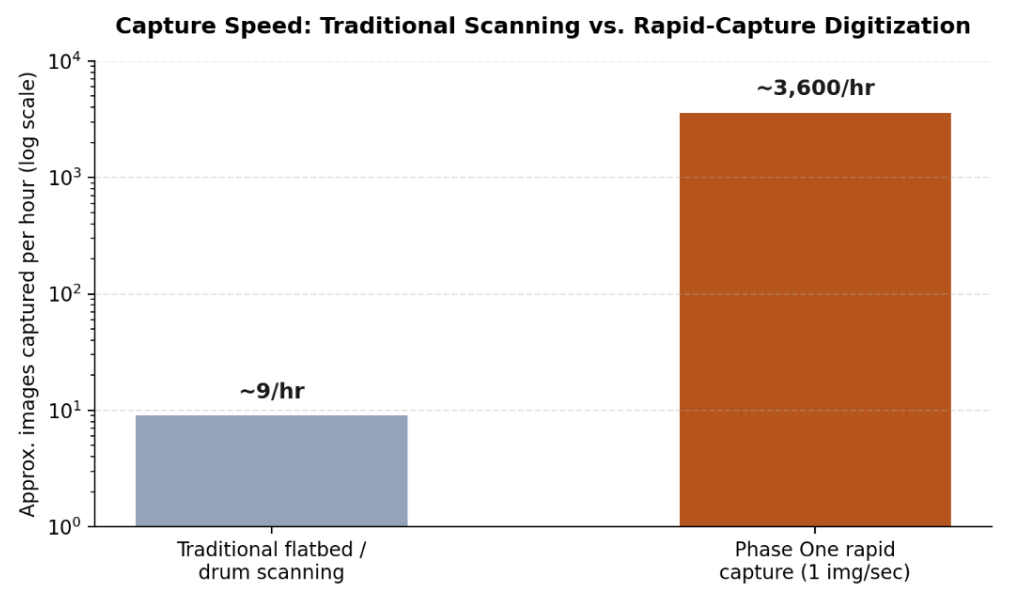
Approximate capture speed comparison between traditional flatbed or drum scanning and rapid-capture digitization (log scale).
That speed difference matters most because preserving the past is often a race against time: much of the material institutions are digitizing has a limited physical lifespan before it’s gone for good, so a workflow capable of moving through a large collection quickly can mean the difference between preserving a complete archive and losing part of it before the work is finished.
What copy stand configurations exist for different collection types?
| Copy stand type | Best suited for |
|---|---|
| Single-camera stationary stand | Smaller digitization projects needing a stable, long-lasting platform with one high-resolution camera system. |
| Dual-camera book system | Rare books that cannot be opened flat, using an automated dual-page capture workflow with two cameras. |
| AutoColumn large-format stand | Large, flat, and thin objects such as maps, newspapers, and drawings, with a metal cover board for secure magnetic positioning. |
| Motorized 2-motion stand | Larger flat objects requiring a bigger baseboard and flexibility across different lens configurations. |
What does digitizing the autochrome process actually involve?
Understanding the autochrome process itself helps explain why these plates need such careful handling. Autochrome plates, a color photography process that flourished from 1907 into the 1930s, present a distinct challenge inside cultural heritage digitization: each autochrome is a unique transparency image with no negative counterpart, meaning there is no duplicate to protect against a mistake during capture. Phase One’s film and glass plate digitization solutions address this class of material with a film capture stage that provides an adjustable, geared support mechanism compatible with a range of carriers built specifically for glass plate negatives, alongside most popular film strip and sheet formats. Glass plate carriers are made of milled high-grade aluminum with an optically-optimized glass base, built to hold plates of varying and sometimes irregular sizes securely and consistently during capture.
The conversion process for this kind of transparent, historical material is genuinely open to interpretation, since the base material and the chemical processing used varies, especially for the earliest glass plates where the specific chemicals and development process are often unknown. Two rolls of film, or two glass plates, may behave very differently, both in the physical characteristics of the original base material and in how that material was originally developed, which is part of why uniform, controlled illumination and consistent color reproduction matter so much throughout the capture process.
What does a well-run digitization workflow need beyond the camera and stand?
- Specialized workflow software: a rapid-capture solution paired with cultural heritage editing tools speeds up both capture and the post-production work of converting negatives to positives and correcting color.
- Simplified interfaces for large volumes: a streamlined capture mode allows less-specialized operators to handle high-volume digitization projects without sacrificing consistency.
- Accurate object identification: integrated barcode scanning during capture helps ensure every digitized object is named and tracked correctly across a large collection.
- Material-appropriate handling: different physical formats, bound books, flat documents, glass plates, each require their own specialized stand and carrier configuration rather than a one-size-fits-all setup.
What quality standards guide professional cultural heritage digitization?
Institutions digitizing valuable or fragile collections don’t simply capture an image and call it done; the output has to meet recognized quality benchmarks that ensure the digital copy is actually fit for long-term preservation and research use. Standards such as FADGI (the Federal Agencies Digital Guidelines Initiative), Metamorfoze, and ISO 19264 define specific technical targets for resolution, color accuracy, and tonal range, giving institutions a common language for specifying what “high quality” actually means in measurable terms rather than a subjective judgment. Meeting these benchmarks typically requires resolution around 300 pixels per inch or higher for most collection material, alongside carefully controlled, even illumination and accurate color calibration throughout the capture process.
| Standard | What it primarily governs |
|---|---|
| FADGI (Federal Agencies Digital Guidelines Initiative) | A star-rating system for image quality covering resolution, tonal response, and color accuracy, widely referenced across libraries and archives. |
| Metamorfoze | A Dutch national standard for image quality in cultural heritage digitization, with defined preservation and access quality tiers. |
| ISO 19264 | An international standard defining objective image quality analysis methods for cultural heritage reproduction. |
What happens to digitized material after capture?
Capture is only the first stage of a complete digitization program. Once an image is captured, it typically passes through post-production steps that can include cropping and alignment, negative-to-positive conversion for film and glass plate material, color correction against calibrated reference targets, and quality control review against whichever standard the institution has adopted. The resulting files are then usually stored in an uncompressed or losslessly compressed master format intended for long-term preservation, alongside smaller derivative files optimized for public access and online display. Metadata capture, recording what the object is, where it came from, and any relevant rights information, runs alongside this whole process, since a beautifully captured image with poor metadata is far less useful to future researchers than a properly documented one.
Frequently Asked Questions
Why can’t hidden or delicate bindings just be opened flat for faster scanning?
Forcing a fragile binding open flat risks damaging the book permanently. Digitization systems built for rare books instead use a dual-camera setup that photographs both pages simultaneously at whatever angle the binding safely allows, rather than forcing the book into a position that risks the original.
What makes autochrome plates harder to digitize than an ordinary photograph?
Each autochrome is a unique transparency with no negative, so there’s no backup if a plate is damaged during handling or capture. The plates are also physically fragile glass, and the exact chemical composition of early examples is often unknown, which makes consistent, accurate color reproduction more challenging than with a standard, well-documented film stock.
How much faster is rapid-capture digitization really, in practical terms?
Systems capable of roughly one image per second can be up to 400 times faster than flatbed, drum, or virtual-drum scanners, which can turn a project that would take months of scanning into one that takes days.
Does a copy stand work for objects other than books?
Yes. Different copy stand configurations exist for flat objects like maps and newspapers, for glass plate negatives and film, and for bound books specifically, each with hardware suited to that particular format’s handling and stability needs.
|
Key Takeaways
|
What is AI TRiSM, and why did Gartner define it?
AI TRiSM stands for AI Trust, Risk, and Security Management, a framework Gartner introduced to describe the technical capabilities organizations need to keep AI systems trustworthy, secure, and compliant, not just when they’re first deployed, but continuously as they operate. The framework’s core argument is that policies alone can’t keep up with how AI systems behave in production: risks emerge dynamically as models respond to new inputs, so governance has to be embedded directly into the systems themselves, through continuous monitoring, validation, and runtime enforcement, rather than relying on periodic review cycles.
Why is the AI TRiSM market growing so much faster than most security categories?
The growth rate here is unusually steep even by cybersecurity standards. MarketsandMarkets’ AI TRiSM market research projects the market will grow from $3.09 billion in 2026 to $11.61 billion by 2031, a compound annual growth rate of 30.3%, driven in large part by the shift from periodic AI assessments toward continuous control as enterprises deploy autonomous, tool-using AI agents. Within that broader market, the AI security and runtime protection platforms segment is forecast to grow even faster, at roughly 33.1% CAGR, which tracks closely with why runtime enforcement, not just governance policy, has become the fastest-moving part of this space.
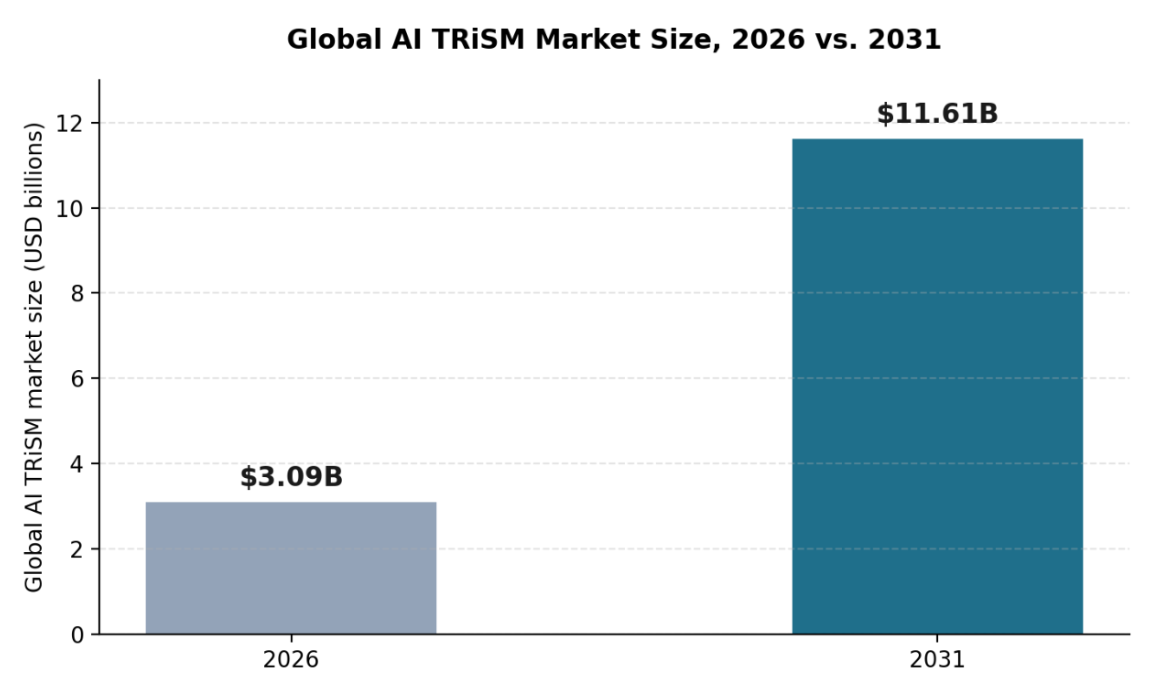
Global AI TRiSM market size, 2026 versus 2031, according to MarketsandMarkets.
What does an AI security platform actually need to cover?
| Pillar | What it covers |
|---|---|
| Discovery (AI-SPM) | A continuous, complete inventory of every AI application, agent, and tool operating across the organization. |
| Runtime protection (guardrails) | Input and output filtering that catches prompt injection, data leakage, and policy violations as interactions happen. |
| Agentic AI security | Visibility into agent decisions, tool calls, and data access, with enforcement that keeps autonomous behavior within intended scope. |
| Compliance & governance | Policy definition and audit-ready documentation mapped to regulations like the EU AI Act, GDPR, and industry-specific standards. |
The case for covering all four pillars from a single AI security platform, rather than four separate point tools, is largely operational: security teams need discovery findings to feed directly into policy enforcement, and agent behavior data to feed directly into compliance reporting, connections that are much harder to maintain across disconnected tools than within one shared system.
Why does agentic AI security specifically need its own attention?
A static chatbot answers questions; an autonomous agent takes actions, and that distinction changes the security calculus considerably. Ovalix’s autonomous and agentic AI security platform is built to give full visibility of AI agent tasks from start to finish, mapping out each decision so guardrails can be enforced and compliance maintained across AI-driven processes, rather than only reviewing outcomes after an agent has already acted. A closely related capability focused specifically on agent behavior safeguards AI agents from malicious manipulation, unauthorized control, and excessive autonomy, which matters because an agent with too much unchecked scope is a fundamentally different risk than a chatbot that simply gives a wrong answer.
What does ‘AI security software’ actually mean in practice?
In practice, the term increasingly refers to platforms consolidating what used to be handled by separate tools, or not handled at all, into one system: shadow AI discovery, data protection, runtime guardrails, and agentic oversight, unified under a shared policy engine and a single source of truth for what AI is running and what it’s doing. That consolidation trend mirrors what happened in adjacent security categories before it, where point solutions eventually gave way to platforms once the operational cost of stitching together separate tools outweighed the benefit of best-of-breed components for each narrow function.
Questions to ask when evaluating an AI security platform
- Does discovery run continuously, or only as a periodic scan that goes stale between runs?
- Does the platform cover agents as well as applications, including tool calls and autonomous decision chains, not just chatbot-style interactions?
- Are guardrails applied in both directions, filtering prompts going in and responses coming out?
- Does compliance reporting draw from the same data as enforcement, or does it require separately maintained records that can drift out of sync?
Frequently Asked Questions
Is AI TRiSM a specific product, or a framework?
AI TRiSM is a framework defined by Gartner, describing a set of capabilities organizations need, not a single named product. Different vendors, including AI security platforms, implement AI TRiSM’s principles in different ways.
Do small organizations need a full AI security platform, or just point tools?
It depends on the scale and complexity of AI usage, but even smaller organizations benefit from discovery and runtime protection working together, since the two feed each other: what you discover shapes what you need to enforce, and vice versa.
What’s the difference between AI security software and general cybersecurity software?
AI security software is purpose-built for risks specific to AI systems, prompt injection, model behavior monitoring, AI agent oversight, that general cybersecurity tools, built around network traffic and endpoint behavior, typically aren’t designed to catch.
Why is agentic AI considered higher risk than earlier generative AI tools?
Because agents don’t just generate text, they take actions and call tools, often chaining multiple steps together autonomously. That expands the potential consequences of a security gap well beyond what a single bad response from a chatbot could cause.
Tomato Breeders and the Push Toward Innovative Specialty Varieties
Cloud Based Live Video Production and the AI Live Production Unit
Book Digitization, Copy Stands, and Digitizing the Autochrome Process

-

 Business Solutions2 years ago
Live Video Broadcasting with Bonded Transmission Technology
-

 Business Solutions1 year ago
The Future of Healthcare SMS and RCS Messaging
-

 Business Solutions2 years ago
2-Way Texting Solutions from Company Message Services
-
 Business Solutions2 years ago
Communication with Analog to Fiber Converters & RF Link Budgets
-

 DSRC Communication2 years ago
The Crossroads of Connectivity: DSRC vs. C-V2X Technologies in Automotive Communication
-

 Business Solutions2 years ago
Wholesale SMS Platforms with OTP Services
-

 Business Solutions2 years ago
Choosing the Right B2B Digital Marketing Agency: A Guide
-

 3D Technology2 years ago
How Multispectral Cameras Advance Book Scanning