


3D Technology
Volumetric Scanning and its Application in the Automotive Industry

3D scanning is revolutionizing multiple industries across the board, from manufacturing to drone-powered inspection of high-value assets.
With 3D scanning, an accurate, three-dimensional image of an object can be acquired in record time, and with relatively little hassle. For example, by flying a drone with multiple sensors over a power line, you can obtain a digital twin of that powerline. You can then use the digital twin for automated, AI-powered inspection.
Advances in technology mean that there are multiple scanning techniques such that it is possible to use a volumetric scanner for almost any application imaginable. You can scan a stationary plane or a large building with laser scanning. With a portable 3D scanner, you can scan a wide range of small objects, from a cup in your house to an engine in a vehicle.
These advances in technology have led to the proliferation of 3D scanning devices. In the past, to scan even a small item, you’d have had to go to a professional 3D scanning company. And you’d have ended up paying a lot of money. Such barriers in terms of equipment and costs meant that 3D scanning was out of reach for many.
However, now, you can get a portable 3D scanner for personal use at a relatively cheap price. 3D scanning has become more affordable and is now within reach for people and businesses.
3D Scanning in the Automotive Industry
The automotive industry has adopted the use of the volumetric scanner at a fast pace, especially in the after-market industry.
3D scanners come in handy when replacing legacy parts. All you have to do is scan a part and you have the blueprint to design it. In the past, getting the design of a legacy part involved a tedious series of measurements using tools such as vernier calipers. It was time consuming; not to mention cumbersome.
Another example of 3D scanning in the automotive industry is when designing chassis for off-road racing trucks. The chassis has to be placed at just the right distance from the engine while allowing enough space for the driver. Using an automotive 3D scanner helps get precise measurements.
While using a professional automotive 3D scanner helps get the best results, you can get decent results with any commercial 3D scanner, especially if you don’t have a choice. However, when dealing with small parts and depending on the reason why you are scanning the vehicle, you might find it better to use a specially made automotive 3D scanner for best results.
For personal use, it is even possible to 3D scan a car with your mobile phone, provided it has the right application and the right hardware. High-end phones usually have support for 3D scanning and can generate decent results, though they are not comparable to the use of a professional 3D scanner.
How Do You 3D Scan a Car?
You may be wondering why one would need to 3D scan a car. For normal car owners, this might not be necessary. But for car enthusiasts who love making modifications to their vehicles, 3D scanning is useful. It helps them make mistakes on their virtual cars when trying out new modifications.
Making mistakes on a virtual version of your car is significantly less expensive than making modifications on your physical car only to realize that you did something wrong. As such, the cost of digitizing the car may even become negligible compared to what a 3D scan saves you.
If you do decide to 3D scan your car, here is a guide on how to go about it.
Decide on the Scanner to Use
If you have a high-end smartphone, you can use it to get a scan of your vehicle. Otherwise, you are probably going to have to use a commercial scanner. These can be expensive.
However, it is possible to find a lower-end model that can get you some decent results.
Get Suitable Scanning Software
Regardless of which device you are using to perform your scan, you’ll need some software to make sense of your results and to transform the raw footage into a point cloud or into a version that you can use to run your simulations and tests.
There are various free software available online. The paid versions are typically expensive and unless you plan to be doing a lot of scanning, you should consider free versions.
The type of software you use will depend on the 3D scanner that you chose. Choose software that is compatible with your scanning device.
You’ll Need a Laptop
If you are scanning a vehicle, you’ll probably be outdoors. You’ll need to connect the 3D scanner to a computer while scanning so that it can process the feed and generate the 3D model. Seeing as most scanners come with short cables, you’ll probably need a laptop so that you can have it with you as you perform the scan.
Get Scanning
Once you have your scanning device and a laptop installed with the right software, you can now start your scan.
The quality of your scan will be affected by certain qualities such as the color of the vehicle you are scanning. Here’s what you need to consider while scanning:
- The minimum distance. Most low-end scanners have to be at least a certain distance from an object to be able to scan it.
- The color. Since 3D scanning involves the interaction of light with the object being scanned, scanners may not work well with shiny or dark surfaces. A way to work around this is to spray the dark and shiny surfaces with some sort of powder.
- Software settings. The settings you use will invariably affect the quality of your scan. Try doing some tests to calibrate your settings for optimal performance.
- Lighting. Most scanners are affected by the sun. They won’t work well when it’s sunny and you should consider scanning at dusk for best results.
Conclusion
Thanks to commercial portable 3D scanners, it is now possible to use scans in a wide variety of applications, even outside industrial uses. One of the industries in which 3D scanning has been widely adopted is in the after-market automotive industry.
3D scanners are great for getting accurate measurements of objects and for developing virtual models to perform tests on.
If you are heavily dependent on 3D scanning, it would be preferable to invest some money in a professional 3D scanner.
Otherwise, it is possible to use low-end scanners and get results that you can work with, though it will take some patience and a lot of maneuvering.


3D Technology
How Multispectral Cameras Advance Book Scanning
Multispectral cameras are revolutionizing book scanning by uncovering hidden details, preserving fragile texts, and advancing historical document analysis. These advanced tools capture layers of information invisible to the naked eye, ensuring priceless works are preserved for future generations while providing new insights into our written past.
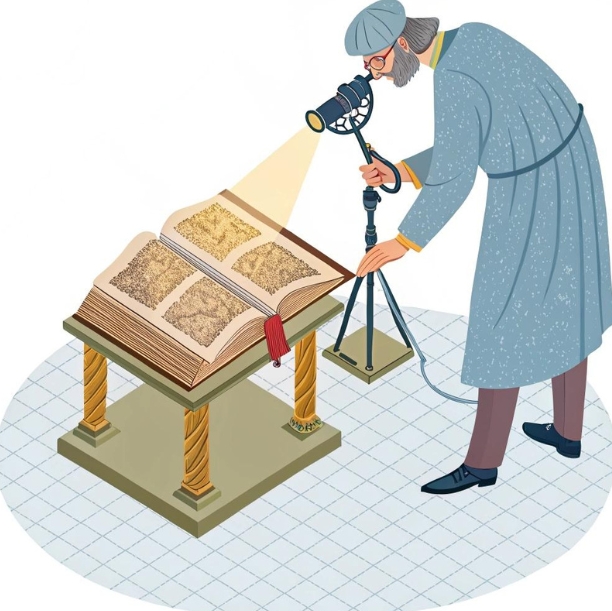
Imagine revealing hidden texts on a centuries-old manuscript without ever touching the ink. That’s the power of modern imaging technology. Today, book scanning has evolved far beyond simple digital copying—thanks in part to the transformative capabilities of the multispectral camera. These advanced imaging tools are helping archivists, conservators, and researchers uncover layers of information once thought lost to time.
From preserving fragile texts to recovering writings that are invisible to the naked eye, multispectral imaging is revolutionizing the way we digitize, understand, and conserve books.
What Makes Book Scanning So Challenging?
At first glance, scanning a book may seem straightforward: open, place on a scanner, capture. But working with historical or rare volumes is anything but simple. The materials are often fragile, with binding that cannot be fully opened without damage. Inks may have faded over centuries, and pages are sometimes warped, stained, or chemically altered by age and environment.
Standard RGB scanners capture what the human eye sees—red, green, and blue light. While this is fine for a crisp, modern paperback, it fails to capture hidden or degraded content that has faded into the paper over time. Texts erased by water damage or overwritten by later scribes often become unreadable under visible light.
The need for non-invasive, high-fidelity imaging that respects the integrity of these delicate works has pushed researchers toward more sophisticated solutions.
How Multispectral Cameras Work
Multispectral imaging captures data at specific wavelengths across the electromagnetic spectrum, including ultraviolet, visible, and infrared light. Unlike traditional photography, which only captures light as we perceive it, a multispectral camera detects subtle variations in how different materials absorb and reflect light beyond the visible range.
Each layer or pigment in a manuscript may react differently under specific wavelengths. For example, iron gall ink absorbs infrared light, which can make faded handwriting reappear. Organic pigments may fluoresce under UV light, revealing marginalia or annotations invisible in daylight.
This multi-layered approach allows digital imaging specialists to isolate and enhance features hidden beneath the surface—sometimes quite literally.
The Hidden Value of Multispectral Imaging in Book Scanning
One of the most powerful applications of multispectral imaging is text recovery. Historical documents often suffer from fading, overpainting, or even intentional erasure. A multispectral camera can bring back those lost words. By adjusting wavelengths and analyzing spectral differences, researchers can virtually peel back layers of ink or paint.
Multispectral cameras have been used to uncover palimpsests—manuscripts where the original text was scraped off and overwritten. This was common practice in the medieval period when parchment was scarce. Imaging under infrared or ultraviolet wavelengths can isolate the original ink from the newer text, allowing scholars to recover works thought lost.
This technology also plays a role in identifying materials. Certain inks or pigments fluoresce or absorb light differently based on their chemical composition. This can help determine the age and origin of a text, supporting authentication and conservation strategies.
In the realm of illuminated manuscripts and rare books, multispectral imaging reveals artistic techniques and editorial changes. What once lay hidden beneath centuries of aging and retouching becomes visible again, enriching the understanding of the object’s history.
Applications in Restoration and Digital Preservation
Digitization is not merely about creating a digital backup. For cultural institutions, it’s about preserving the experience, the texture, and the historical context of a book. Multispectral imaging helps achieve that goal.
With a multispectral camera, archivists can produce a digital twin of a rare book, capturing more than just the ink on the page. The system can identify discoloration, mold, and water damage—data that informs conservation plans. In some cases, multispectral imaging has revealed insect trails, binding repairs, or even notes from bookbinders left on the inner spine.
In academic research, this depth of imaging allows scholars remote access to detailed replicas, reducing the need to physically handle delicate materials. This not only preserves the book but also democratizes access for institutions without direct access to such collections.
Multispectral vs. Hyperspectral Imaging: What’s the Difference?
The terms multispectral and hyperspectral are often used interchangeably, but there are key differences. Multispectral imaging captures data across a limited number of discrete bands—typically anywhere from 3 to 15. Hyperspectral imaging, by contrast, collects data from hundreds of contiguous spectral bands.
For book scanning purposes, multispectral systems strike a balance between performance and practicality. They are generally more compact, faster, and easier to operate, while still providing the necessary level of spectral detail to uncover hidden or faded content.
Hyperspectral systems may offer finer spectral resolution, but they require more data storage, longer processing times, and more complex calibration. In many archival and preservation settings, the benefits of multispectral imaging outweigh the added complexity of hyperspectral setups.
Choosing the Right Equipment for Cultural Heritage Work
Not all imaging systems are created equal. When selecting a camera system for book scanning, institutions must consider resolution, wavelength range, sensitivity, and software capabilities.
A high-quality multispectral camera designed for cultural heritage work should allow tunable illumination across UV, visible, and IR bands. The camera sensor must be sensitive enough to capture subtle contrasts, and the lens system should minimize distortion, particularly at the edges of curved pages.
Equally important is the software. Advanced processing tools allow operators to isolate channels, adjust contrast, and combine spectral layers to produce meaningful images. The software must also support metadata standards required for digital archiving, ensuring long-term usability and searchability of the files.
Portability and non-contact operation are often critical in environments like libraries or monasteries where the subject cannot be moved or unbound. Systems that support adjustable lighting angles and image stacking also help reduce glare and page curvature.
Challenges and Best Practices in Multispectral Book Scanning
As powerful as multispectral technology is, it’s not without its challenges. Calibration is essential—ambient light, temperature shifts, or misaligned optics can skew results. Most workflows require regular calibration using reference targets to ensure color fidelity and wavelength accuracy.
Lighting must be controlled precisely. Too much UV exposure, for example, can degrade delicate pages. Many systems use pulsed or narrow-band LED lighting to minimize heat and light damage while maintaining illumination consistency.
Stabilizing the book is another critical factor. Scanning should be done with minimal physical stress. Cradles, vacuum tables, or V-shaped book supports are commonly used to hold books gently in place without opening them beyond their structural limits.
Metadata is a final consideration. Multispectral scans produce large volumes of data—often hundreds of megabytes per page. Organizing, labeling, and backing up these files in accordance with international standards is essential for long-term accessibility.
Illuminating the Invisible, One Page at a Time
Multispectral imaging is opening doors once thought permanently closed. Faded poetry, erased philosophies, and hidden marginalia are reemerging into view—not through excavation, but through light.
As libraries, museums, and archives race to digitize and preserve the world’s most precious documents, the value of high-resolution, wavelength-targeted imaging becomes clear. A multispectral camera doesn’t just scan a book—it tells its full story, one invisible layer at a time.
Institutions that embrace these technologies will lead the way in conservation, access, and scholarship. For the historians, linguists, and preservationists of tomorrow, these scans will be the key to unlocking the past.
Reveal centuries of history with modern book scanning systems powered by multispectral imaging.
FAQs on Multispectral Imaging and Book Scanning
- What is a multispectral camera and how is it used in book scanning?
A multispectral camera captures images across different light wavelengths—such as ultraviolet, visible, and infrared—to reveal hidden or faded details in books that aren’t visible to the naked eye. - How does multispectral imaging differ from traditional scanning?
Traditional scanning captures visible light (RGB), while multispectral imaging collects data from specific non-visible wavelengths, allowing it to uncover erased text, watermarks, or pigment changes in old manuscripts. - Why is multispectral imaging important for cultural heritage preservation?
It enables archivists and researchers to digitally recover and preserve texts, annotations, and materials that are at risk of being lost due to aging, damage, or previous erasure. - Can multispectral cameras damage fragile books?
No, they are non-contact and use controlled lighting. Many systems are specifically designed to minimize exposure to UV or heat, making them safe for delicate or ancient materials. - What types of materials benefit most from multispectral book scanning?
Rare manuscripts, parchment texts, palimpsests, and any documents with faded inks or hidden writings benefit greatly from multispectral imaging. - How does multispectral imaging help in text recovery?
It isolates ink and pigment types by analyzing how they react to different wavelengths, allowing hidden, overwritten, or faded text to become readable again. - Is multispectral imaging better than hyperspectral for scanning books?
Multispectral imaging offers a good balance of performance and practicality. It’s typically faster and more manageable for libraries, while hyperspectral provides more data but with added complexity. - What equipment is needed to perform multispectral book scanning?
A multispectral camera, tunable lighting (UV, VIS, IR), stable book cradles, calibration targets, and specialized image processing software are essential components. - Can libraries and archives afford multispectral imaging systems?
While advanced systems can be costly, there are compact and modular solutions becoming more affordable, especially with grant funding or institutional partnerships.
3D Technology
PROFESSIONAL AND INDUSTRIAL PORTABLE 3D SCANNERS
Moving into the 3D era of technology is becoming increasingly more important for businesses and entrepreneurs, no matter what industry you work in. Having a reliable and portable 3D scanner can be an invaluable addition to streamline your processes, allowing you to quickly create accurate digital models or prototypes with ease. But which one should you choose? We’ll help you make this decision by discussing some of the best portable 3D scanners available on the market today. From professional grade options to budget-friendly choices, we have covered all bases so that everyone can find something that fits their needs without breaking the bank!
Portable 3D scanners offer advantages over their fixed counterparts, including increased flexibility, portability, and affordability. 3D scanners are becoming increasingly popular in both professional and industrial settings. In this blog post, we’ll take a look at some of the best portable 3D scanners on the market and some of the key features to look for when choosing one. We’ll also provide tips on getting the most out of your scanner once you’ve got it.
What is a 3D Scanner?
A 3D scanner is a device that captures the three-dimensional shape of an object. The data captured by a 3D scanner can be used to create a digital model of the thing, which can then be 3D printed or used in other applications.
3D scanners come in various shapes and sizes and use different technologies to capture 3D data. The most common type of 3D scanner is the laser triangulation scanner, which uses lasers to measure the distance between the scanner and the object being scanned. Other types of 3D scanners include:
Structured light scanners project light patterns onto an object and measure how those patterns are distorted.
Time-of-flight scanners measure how long it takes for pulses of light to bounce back from a thing.
Phase shift scanners measure minute changes in the phase of laser light as it reflects off an object.
Most 3D scanners are portable devices that can be used on large and small objects. Some scanners are designed specifically for scanning human bodies, while others are better suited for scanning objects like cars or airplanes. Industrial-grade 3D scanners can cost tens of thousands of dollars, but many affordable consumer-grade scanners are also available.

How Does a 3D Scanner Work?
3D scanners are devices that capture the three-dimensional shape of an object. They work by projecting a laser or other light source onto the surface of an object and measuring the distance between the scanner and the thing. This data is then used to create a 3D model of the object.
There are several different types of 3D scanners, each with its own strengths and weaknesses. Some scanners are designed for specific tasks, such as scanning human bodies or large objects, while others are more general purpose.
How does a 3D scanner work?
Most 3D scanners use lasers to capture detailed measurements of an object’s surface. The laser beam is projected onto the object’s surface and bounced back into the scanner. This process is repeated from different angles to create a complete 3D model of the thing. The time it takes for the laser to bounce back is used to calculate the distance between the scanner and the object.
Other types of 3D scanners use different methods to capture measurements. For example, some scanners use multiple cameras to take pictures of an object from different angles. These images are then stitched together to create a 3D model.
What are the benefits of using a 3D scanner?
3D scanning has many applications in both industry and consumer products. In industry, 3D scanners are used for quality control, reverse engineering, and inspection tasks. They can be used to scan anything from small parts to large vehicles.
The Different Types of 3D Scanners
There are three main types of 3D scanners: laser triangulation, structured light, and time-of-flight. Each type of scanner uses different technology to measure the distance from the scanner to the object being scanned.
Laser triangulation scanners use a laser beam bounced off the surface of the object being scanned. The reflected light is then captured by a sensor, which calculates the distance from the scanner to the thing based on the time it takes for the light to travel from the scanner to the object and back again.
Structured light scanners project a light pattern onto the surface of the scanned object. The design is distorted by any bumps or curves on the surface of the object, and this distortion is captured by a camera. By analyzing the distortion, the software can calculate the object’s shape.
Time-of-flight scanners emit a pulse of infrared light and measure how long it takes for that light to bounce back off of the surface of the object being scanned. This information calculates the distance from the scanner to different points on the object’s character, which can then be used to create a 3D model.
Pros and Cons of 3D Scanners
3D scanners have a lot of potential in a variety of industries. They can provide accurate measurements of objects, which is helpful in many situations. Additionally, 3D scanners can create 3D models of things, which can be used for design or analysis.
However, there are some disadvantages to using 3D scanners. They can be expensive, and the data they produce can be challenging to work with. Additionally, 3D scanners require much setup time and expertise to use correctly.
What are 3D Scanners Used For?
3D Scanners are used for a variety of purposes, including:
-Creating 3D models of objects
-Reverse existing engineering objects
-Scanning large areas or landscapes
-Capturing data for accuracy and precision in measurement and manufacturing
-Creating virtual reality experiences
How Much do 3D Scanners Cost?
Depending on their features and accuracy, 3D scanners can range in price from a few hundred dollars to several thousand. Professionals and industries use the most expensive scanners, while hobbyists and enthusiasts often use the less expensive ones.
No matter your budget, there is a 3D scanner out there that will suit your needs. If you need an accurate and reliable scanner for professional use, you will need to spend more on a high-end model. However, if you only need a scanner for personal use, you can get away with spending less on a lower-end model.
To sum up, how much you spend on a 3D scanner depends on your needs and requirements. You will need to spend more money if you need a powerful and accurate scanner for professional use. However, if you only need a scanner for personal use, you can get away with spending less.
Conclusion
If you’re looking for a 3D scanner that’s both professional and portable, you’ll want to check out the selection of scanners on offer from Artec Group. With various models, we’re sure you’ll find the perfect scanner for your needs. And with our competitive prices, you can be sure you’re getting the best value for your money. So why wait? Order yours today!
3D Technology
3D scanning technologies and scanning process
3D scanning is a process of creating three-dimensional digital models from real-world objects. The technology has found a number of applications in different industries, including health care, manufacturing, and product development. In this blog post, we will take a look at the different types of 3D scanning technologies and the scanning process.
3D scanning technologies have become increasingly popular over recent years as a means of digitizing objects and environments for a variety of purposes.
The 3D scanning process can create highly accurate 3D models of objects or environments for applications such as industrial design, reverse engineering, and quality control.
This blog post will explore the basics of 3D scanning technologies and the 3D scanning process. We will also discuss some of the typical applications for 3D scanning and how they can be used to enhance your workflow.
What is 3D scanning?
First and foremost, 3D scanning is the process of capturing the three-dimensional surface of an object. This can be done using various technologies, including lasers, structured light, and computed tomography.
Once the data is captured, it can create a 3D object model. This model can be used for many different purposes, such as engineering analysis or reverse engineering. Additionally, 3D scans can create physical objects through additive manufacturing processes like 3D printing.
Several factors determine the right 3D scanning technology for a given application. These contain the size and shape of the object being scanned, the desired level of detail, and the environment in which the scan will take place.
The different types of 3D scanners
There are three primary types of 3D scanners: laser triangulation, structured light, and photogrammetry. Each type of scanner has its own strengths and weaknesses, so when choosing the right one for your specific application is essential.
Laser triangulation scanners use a laser beam to scan an object and create a 3D model. These scanners are relatively inexpensive and easy to use, but they have limited accuracy and can only scan brightly lit things.
Structured light scanners use a projector to project a light pattern onto an object. The object’s surface distorts the way of light, which is then captured by a camera. These scanners are more accurate than laser triangulation but are also more expensive.
Photogrammetry scanners use multiple cameras to take pictures of an object from different angles. The images are then combined to create a 3D model. Photogrammetry scanners are very accurate, but they are also costly.
How does the 3D scanning process work?
The first step in the 3D scanning process is to capture the geometry of an object using a 3D scanner. There are a variety of 3D scanners on the market, each with its strengths and weaknesses. Some scanners use laser beams to capture geometry, while others use structured light or optical triangulation.
Once the geometry has been captured, it must be converted into a digital model. This is done by post-processing the raw data from the scanner into a format that can be read by CAD software. The accuracy of the final model will depend on the quality of the data captured by the scanner and the skill of the person doing the post-processing.
Once a digital model has been created, it can be used for various purposes. It can be 3D printed, used for CNC machining, or viewed on a computer screen.
Pros and cons of 3D scanning
Regarding 3D scanning, there are a few significant Pros and Cons to consider before taking the plunge. But ultimately, the pros outweigh the cons for most users.
Pros:
-3D scanning can capture intricate details that would be difficult or impossible to reproduce with traditional methods like hand sculpting or molding.
-3D scans can create accurate models for engineering and design purposes.
-3D scanning can create realistic replicas or props for movies, video games, and other forms of entertainment.
-3D scanners are becoming more affordable as the technology continues to develop and advance.
Cons:
-3D scanning can be time-consuming, depending on the size and complexity of the object being scanned.
-Some 3D scanners require special software to work correctly, which can add an extra layer of cost and complexity.
-3D scanning may not be necessary for objects that can be adequately reproduced with more straightforward methods like 2D drawings or photographs.
What are the applications of 3D scanning?
There are many different applications for 3D scanning technologies. These can be used in various industries, including architecture, engineering, construction, and manufacturing.
Some typical applications of 3D scanning technologies include:
-Creating accurate 3D models of existing objects or structures
-Reverse existing engineering products
-Generating as-built documentation for construction projects
-Creating prototypes for new products or designs
-Analyzing data from crash tests or other types of simulations
Conclusion
In recent years, 3D scanning technologies have come a long way, and the 3D scanning process has become much more user-friendly. Whether you’re looking to create a 3D model of an object for your business or are simply curious about how 3D scanning works, we hope this article has given you a better understanding of the technology and the process.
Tomato Breeders and the Push Toward Innovative Specialty Varieties
Cloud Based Live Video Production and the AI Live Production Unit
Book Digitization, Copy Stands, and Digitizing the Autochrome Process

-

 Business Solutions2 years ago
Live Video Broadcasting with Bonded Transmission Technology
-

 Business Solutions1 year ago
The Future of Healthcare SMS and RCS Messaging
-

 Business Solutions2 years ago
2-Way Texting Solutions from Company Message Services
-

 Business Solutions2 years ago
Communication with Analog to Fiber Converters & RF Link Budgets
-

 DSRC Communication2 years ago
The Crossroads of Connectivity: DSRC vs. C-V2X Technologies in Automotive Communication
-

 Business Solutions2 years ago
Wholesale SMS Platforms with OTP Services
-

 Business Solutions2 years ago
Choosing the Right B2B Digital Marketing Agency: A Guide
-

 3D Technology2 years ago
How Multispectral Cameras Advance Book Scanning