


Industrial Solutions
What Is an Industrial Cellular Router, and How Do You Choose One?


Key Takeaways
- An industrial cellular router connects field equipment to a wider network over LTE or 5G and is built for harsh environments and industrial protocols.
- Dual-SIM failover keeps unattended sites online by switching automatically to a second mobile network when the first one fails.
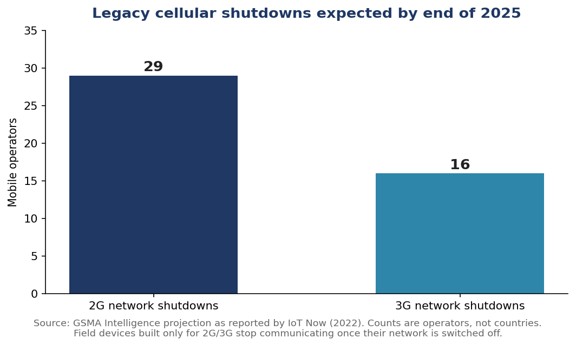
- GSMA Intelligence expected 29 operators to shut down 2G and 16 to close 3G by the end of 2025, making LTE or 5G the safe baseline for new routers.
- • LTE Cat 4 covers most telemetry and SCADA traffic, while 5G is the better fit for video, dense sensor sites and the longest service life.
Remote infrastructure has a connectivity problem that fiber alone cannot solve. Pumping stations, roadside cabinets, solar sites, water tanks and temporary construction yards are often miles from the nearest wired network, yet operators still need live data from them. For many of these sites the answer is an industrial cellular router, a device that has quietly become one of the workhorses of operational networks. This explainer covers what the device does, how it differs from a standard router, and what to check before choosing one.
What is an industrial cellular router?
An industrial cellular router is a networking device that connects field equipment to a wider network over cellular links such as LTE, LTE-Advanced or 5G, and is engineered for ruggedness, extended temperature ranges and industrial protocols rather than office use. In practice, the router sits between local equipment (an RTU, a PLC, a smart meter concentrator, a CCTV camera) and the operator’s control center, carrying data back over a mobile network instead of a leased line.
The category spans a wide range of capability. At one end are compact LTE Cat 4 units suited to low-bandwidth telemetry; at the other are 5G models with standalone (SA) and non-standalone (NSA) support, Wi-Fi 6 and Bluetooth. A current overview of one industrial router family shows how wide that span has become, from LTE Cat 4 to full 5G SA/NSA in the same product line.
How is an industrial cellular router different from a consumer or office router?
The difference is environmental and protocol-level: an industrial cellular router is built to survive heat, cold, vibration and dust, and it speaks the serial and industrial protocols that field equipment uses. A home or office router assumes a clean, climate-controlled shelf and Ethernet-connected laptops. A field router assumes a sealed cabinet in direct sun, a DC power feed, and an older RTU that only talks over RS-232 or RS-485.
Typical industrial features include DIN-rail mounting, ruggedized enclosures, serial interfaces, digital I/O ports, USB and GPS. GPS is not a luxury feature here: it lets operators confirm the physical location of mobile or temporary assets and time-stamp events. Security is the other major difference. Field routers usually ship with built-in firewalls and VPN support (commonly IPsec and OpenVPN) because they carry SCADA traffic across public mobile networks, where an unprotected link would expose control systems to the internet.
Why does dual-SIM failover matter so much in the field?
Dual-SIM failover keeps a remote site online when one mobile operator’s network degrades or drops, by automatically switching to a second SIM on a different network. For unattended sites, the cost of a lost link is rarely the data itself; it is the truck roll needed to diagnose the outage. A router that can fail over between two SIMs, and between cellular and a wired interface where one exists, removes most of those visits.
Fallback across radio generations works on the same principle. Many LTE routers can drop to 3G or 2G when LTE coverage is weak, which helps in rural areas. That fallback, however, is becoming less dependable as legacy networks close, and planners should treat it as a bonus rather than a core part of the resilience design.
How are 2G and 3G shutdowns changing router selection?
2G and 3G shutdowns are pushing operators to specify LTE or 5G as the primary radio for any new industrial cellular router, because devices built only for legacy networks stop working entirely once those networks are switched off. GSMA Intelligence projected that 29 operators would shut down 2G and 16 would close 3G by the end of 2025, with Taiwan the first market to retire both. Survey work by James Brehm & Associates put the share of cellular IoT devices still running on 2G or 3G at 53.1 percent at the time of its 2019 study.
The practical takeaway is a lifecycle one. Industrial equipment often stays in service for a decade or longer, so a router bought today should be chosen for the network that will exist in 2035, not the one that exists now. That argues for at least LTE Cat 4, with 5G worth the premium wherever video, high-rate sensor data or long service life is expected.
When does 5G make sense for an industrial router, and when is LTE enough?
LTE is enough for most telemetry, metering and SCADA polling, which move small amounts of data; 5G makes sense when a site carries video, aggregates many devices, or needs the longest possible service life on modern networks. A compact LTE Cat 4 router delivers cellular throughput of up to 150 Mbps, which is far more than a substation RTU or a tank-level sensor will ever use. One compact LTE Cat 4 design pairs that throughput with 2.4 GHz Wi-Fi and dual SIMs in a small DIN-rail footprint, which is typical of the class.
Video changes the math. CCTV and surveillance at remote sites, real-time remote camera control, and sites that act as a local hub for dozens of sensors all benefit from the extra capacity and lower latency of 5G. A 5G SA/NSA router with Wi-Fi 6 and Bluetooth illustrates what the upper tier now includes: tri-band Wi-Fi at 2.4, 5 and 6 GHz, four 5G antenna ports, serial connectivity and GPS in one ruggedized unit.
| Requirement | LTE Cat 4 router | 5G SA/NSA router |
| SCADA polling, metering, alarms | Well suited | Capacity to spare |
| Multi-camera CCTV, video analytics | Limited | Well suited |
| Many local sensors aggregated at one site | Workable at small scale | Well suited |
| Longest expected service life on public networks | Good | Best |
| Lowest unit cost and power draw | Usually better | Usually higher |
What should be on a selection checklist for an industrial cellular router?
A practical checklist covers five areas: radio generation and bands, physical ruggedness, interfaces and protocols, security, and remote manageability. Each one maps to a failure mode that field teams already know well.
- Radio and bands: confirm the model supports the LTE or 5G bands used by the operators in the deployment region. Industrial routers are often sold in regional variants (North America, Europe, Oceania) for exactly this reason.
- Ruggedness: check the rated temperature range, the enclosure, and DIN-rail mounting against the actual cabinet conditions, not the brochure average.
- Interfaces: count the serial ports (RS-232 and RS-485), Ethernet ports and digital I/O needed by the equipment already on site.
- Security: require a built-in firewall, IPsec or OpenVPN, and remote access over SSH and HTTPS rather than unencrypted management.
- Manageability: look for cloud or platform management, over-the-air firmware updates and remote diagnostics, so that a fleet of hundreds of routers can be maintained without site visits.
Where are industrial cellular routers deployed today?
Industrial cellular routers are deployed wherever operational data has to travel from a site without reliable wired connectivity, most commonly in utilities, oil and gas, water, smart cities and transportation. Common jobs include backhauling asset monitoring data, carrying SCADA communications from remote substations and wellheads, connecting traffic and surveillance cameras, and giving temporary sites (construction, events, emergency response) a network within hours.
Asset monitoring is the fastest-growing of these. Instead of sending technicians on scheduled rounds, operators place sensors on pumps, transformers, tanks and towers and read them continuously. The router is the link that makes that data usable. Coverage of remote asset monitoring deployments shows how cellular routers and IoT gateways are typically combined in these projects, with the router handling backhaul and the gateway handling local sensor aggregation.
Frequently Asked Questions
What is the difference between an industrial cellular router and an IoT gateway?
An industrial cellular router mainly provides secure backhaul from a site over LTE or 5G, while an IoT gateway focuses on collecting and translating data from local sensors and devices; many deployments use both.
Do industrial cellular routers need a fixed public IP address?
Not necessarily, because most industrial cellular routers build an outbound VPN tunnel (such as IPsec or OpenVPN) to a central hub, which avoids exposing the site directly to the internet.
Is LTE Cat 4 fast enough for SCADA and metering?
Yes, LTE Cat 4 offers up to 150 Mbps, which is far more capacity than SCADA polling, alarms and meter reads typically require.
Why do industrial routers include GPS?
GPS lets operators verify the location of mobile or temporary assets and provides an accurate time reference for logging field events.


Key Takeaways
- A system in package (SiP) integrates separately manufactured dies, passives, MEMS and RF components into one package that performs a complete system function.
- Unlike a system-on-chip, a SiP can combine dies built on different processes and materials, such as silicon CMOS, SiGe, GaAs and GaN.
- A multi-chip module typically forms a tightly coupled subsystem, while a SiP is usually expected to deliver a complete system.
- SiP improves yield because a die that fails inspection can be replaced before assembly instead of scrapping the whole system.
Engineers comparing integration options usually end up weighing three approaches: put everything on one die, place several dies on a shared substrate, or build a complete subsystem inside a single package. Those choices go by the names system-on-chip (SoC), multi-chip module (MCM) and system-in-package (SiP), and the differences between them shape cost, yield, schedule and how much freedom a design team has to mix technologies. This guide compares the three side by side and explains where each one fits.
What is a system in package (SiP)?
A system in package is a single package that integrates multiple separately manufactured components, such as dies, passives, MEMS devices and RF parts, into one assembly that performs a complete system function. The IEEE Heterogeneous Integration Roadmap uses almost exactly this framing, describing heterogeneous integration as combining separately manufactured components into a higher-level assembly, the SiP, that delivers enhanced functionality and improved operating characteristics. In that definition, a component can be an individual die, a MEMS device, a passive component, or an already assembled package or subsystem.
A useful practical description of system in package technology frames the goal as a system close to the SoC form factor, but with better yield, lower overall cost, higher flexibility and a faster route to market. SiP designs draw on a growing toolbox: vertical and horizontal interconnect technologies, encapsulation for protection and stabilization, and a wide range of packaging architectures.
How is a SiP different from a system-on-chip?
A system-on-chip builds all functions into one monolithic piece of silicon on a single process node, while a SiP assembles several dies, each potentially made on a different process and material, inside one package. That distinction matters because logic, RF, power and sensing functions rarely perform best on the same process. The IEEE overview of SiP technology notes that heterogeneous integration lets a package combine dies built in different process nodes and materials, including silicon CMOS, SiGe, GaAs and GaN. An SoC cannot do that by definition.
Yield is the second major difference. With a monolithic die, a defect anywhere can scrap the whole chip. In a SiP, a die that fails incoming inspection can be replaced before assembly without discarding the rest of the system, which is one reason SiP is often described as the higher-yield path to SoC-like density.
How is a SiP different from a multi-chip module?
A multi-chip module places two or more dies on a shared substrate so they operate as one tightly coupled component, whereas a SiP is usually expected to deliver a complete system function. The two terms overlap heavily, and many engineers use them loosely, but the difference lies mainly in scope. An MCM typically represents a tightly coupled subsystem, such as a processor paired with memory, rather than a whole system. A SiP more often pulls in passives, filters, sensors or MEMS alongside the dies, so the finished part can act as a self-contained functional block.
Historically, the biggest obstacle for both approaches was the availability of known good die (KGD): if bare dies cannot be fully tested before assembly, the yield advantage of multi-die integration shrinks quickly. Improvements in die-level testing are a large part of why multi-die packaging has become mainstream.
SiP vs. SoC vs. MCM: how do they compare?
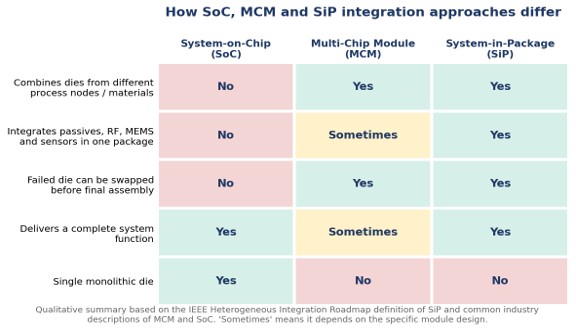
The quickest way to compare the three approaches is by what each one integrates, how it handles yield, and where it typically shows up in products. The table below summarizes the main differences.
| Factor | System-on-Chip (SoC) | Multi-Chip Module (MCM) | System-in-Package (SiP) |
| What is integrated | All functions on one monolithic die | Two or more dies on a shared substrate | Dies plus passives, RF, MEMS or sensors in one package |
| Mixed process nodes and materials | No | Yes | Yes |
| Yield behavior | One defect can scrap the whole die | Depends on known good die | Failed die can be replaced before assembly |
| Typical scope | Complete system on silicon | Tightly coupled subsystem | Complete system function |
| Main trade-off | High development cost and long design cycles | Substrate, thermal and test complexity | Package co-design and test complexity |
Why is testing a SiP harder than testing a single chip?
Testing a SiP is harder because a single package contains several different kinds of devices, and digital, analog and RF dies each need their own test approach. For digital dies, the IEEE 1149.1 boundary-scan standard and its extensions provide structured test access. Analog and RF components are a different story: they still require custom test strategies and probe access at the package pins. That makes reliability engineering a central part of any SiP program, not an afterthought. A detailed look at SiP reliability analysis and test methods shows how failure analysis and qualification testing fit into the development cycle.
Which manufacturing routes are used to build SiPs?
SiPs can be built on organic laminate substrates, on wafer-level redistribution layers, or on large rectangular panels, and the right route depends on volume, feature size and cost targets. Wafer-level approaches use redistribution, fan-out or stacking processes to connect multiple dies before the package is completed. Panel-based processing applies similar ideas to a larger format, and engineers weighing the two can compare panel-level versus wafer-level processing to understand where each makes economic sense.
Where horizontal space runs out, designers move vertically. Package-on-package (PoP), common in mobile processors, stacks a memory package on top of a logic package and connects them at the package boundary, reaching high memory bandwidth without a dedicated interposer. More advanced options place dies side by side on an interposer or stack them directly, and an overview of 2.5D and 3D die stacking options covers how those architectures change routing, thermal and assembly requirements.
Which industries are driving SiP adoption?
High-performance computing, mobile devices, automotive, medical wearables, aerospace and defense, and IoT are the main markets pushing SiP and heterogeneous integration forward. Those six application areas are named as the leading drivers in the Heterogeneous Integration Roadmap, which has been sponsored since 2015 by the IEEE Electronics Packaging Society, SEMI, the IEEE Electron Devices Society, the IEEE Photonics Society and the ASME EPPD Division, after the Semiconductor Industry Association closed the earlier ITRS roadmap. The roadmap’s public program page on SEMI’s site explains how the effort is governed, and the 2025 edition updated 25 chapters. Across all of these markets, the appeal is the same: SoC-like density without forcing every function onto one process.
When should a design team choose SiP over SoC or MCM?
SiP is usually the better choice when a product needs functions built on different semiconductor processes, when volumes do not justify a custom SoC, or when the schedule cannot absorb a full silicon development cycle. An SoC still makes sense for very high-volume products where the up-front development cost can be spread across millions of units and every square millimeter and milliwatt counts. An MCM fits well when the goal is a tightly coupled pair or group of dies, such as compute with memory, rather than a complete system.
For many programs, the decision comes down to three questions. Do the required functions share a process node? Is the volume high enough to amortize custom silicon? And is the team prepared to co-design the die, package and board together? If the honest answers are no, no and yes, a SiP is very likely the right fit. The IEEE topic overview of system-in-package is a good neutral starting point for teams new to the trade-offs.
Frequently Asked Questions
What is the difference between SiP and SoC?
A system-on-chip puts all functions on one monolithic die built on a single process, while a system in package combines several separately manufactured dies and components, often from different processes and materials, inside one package.
Is a multi-chip module the same as a system in package?
Not exactly. A multi-chip module usually describes several dies on a shared substrate acting as a tightly coupled subsystem, while a system in package is generally expected to deliver a complete system function and often includes passives, RF parts, sensors or MEMS.
Why do system in package designs often have better yield than SoCs?
In a system in package, a die that fails inspection can be replaced before assembly, so one defect does not scrap the entire system the way it can with a single monolithic die.
Which industries use system in package technology?
System in package technology is widely used in high-performance computing, mobile devices, automotive electronics, medical wearables, aerospace and defense, and IoT products.
Industrial Solutions
7 Signs Your IT Hardware Warehousing and RMA Partner Isn’t Built for Compliance
IT equipment warehousing and distribution means storing server, telecom, and data center hardware in strategically located facilities and distributing it as customers need it, instead of shipping every unit individually from origin. It sounds like a straightforward storage function until a shipment gets held at customs because the warehouse partner had no certification knowledge, or a next business day replacement misses its window because the spare part was never pre cleared. The seven signs below separate a partner actually built for regulated hardware from a generic storage vendor.
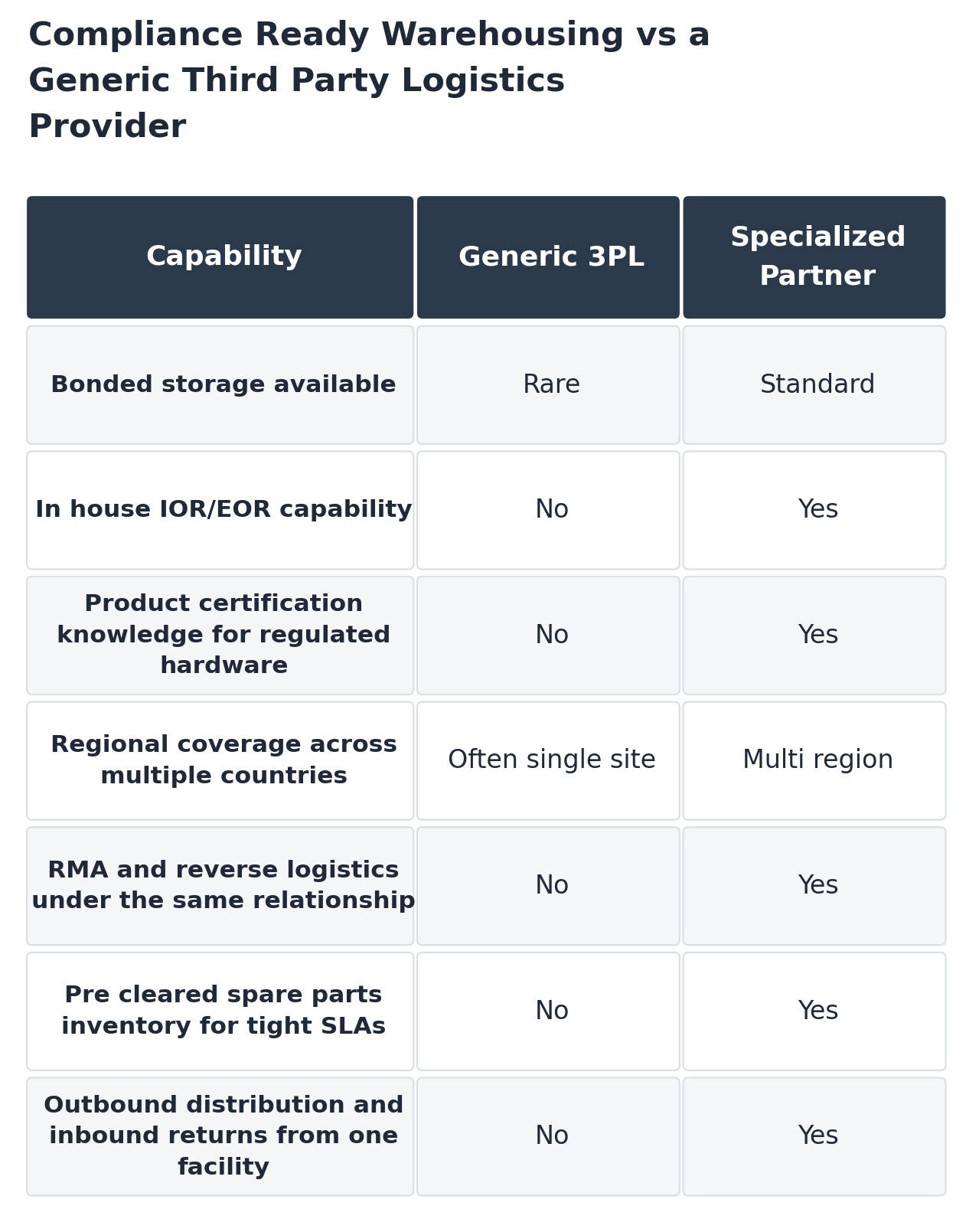
1. No Bonded Storage Capability
Bonded storage lets imported goods sit in a warehouse without paying duties or taxes until they are actually sold, distributed, or re-exported. For hardware held on a shelf awaiting deployment, that means capital is not tied up in duty payments on units that have not moved yet. A partner without bonded storage forces duty payment up front regardless of how long the equipment sits in inventory.
2. No In House IOR or EOR Capability
A compliance ready warehouse pairs physical storage with customs capability under the same relationship, since the same provider is usually already handling clearance. When warehousing and customs sit with two separate vendors, every shipment needs coordination between them, and that gap is where delays and miscommunication show up.
3. No Certification Knowledge for Regulated Hardware
Importing technology, IT hardware, and security equipment differs from importing ordinary commodity goods. Each country applies its own rules for electrical, radio frequency, encryption, and other technical standards, and a generic 3PL rarely has that knowledge built in. A partner that cannot speak to product certification requirements is guessing at exactly the point where guessing is most expensive.
4. A Single Warehouse Instead of Regional Coverage
Serving multiple countries from one distant facility means every shipment, even a small urgent order, crosses a border and a customs process. Regional coverage puts inventory closer to where it is actually needed, which matters most for time sensitive replacement parts.
- A single regional hub can often serve several neighboring markets without a dedicated facility in each one
- Not every country requires its own warehouse, but every shipment from a distant single site does require its own clearance
5. RMA Is Handled by a Separate Vendor
Warehousing is not just about the initial deployment. Regional inventory positioned under an existing import relationship is what makes fast RMA turnaround possible, since a replacement unit can ship from nearby stock instead of waiting on a fresh customs clearance from origin. When warehousing and RMA sit with two different vendors, that speed advantage disappears.
6. No Pre Cleared Spare Parts Inventory
A 24 hour or next business day support commitment sounds simple until it has to survive an international border. Meeting it requires pre-cleared spare parts inventory staged in the region, an active import relationship so replacements do not wait on paperwork, and a courier network that does not add its own delay on top of an already tight window. Without pre cleared inventory, the tightest SLA tiers are not realistic no matter what a vendor promises on paper.
7. Outbound and Inbound Flows Run Through Separate Facilities
Returns can be received, inspected, and redistributed from the same facility handling outbound distribution, or they can bounce between two disconnected operations. One provider covering both directions is generally more efficient than coordinating a warehousing vendor and a separate reverse logistics vendor for the same regional footprint.
Compliance Ready Warehousing vs a Generic 3PL
Compliance ready warehousing versus a generic third party logistics provider for IT and data center hardware
Where This Shows Up Most
Regional distribution matters most where customs and telecom certification regimes are heaviest. Warehousing built around IT equipment warehousing and distribution needs, rather than generic storage, tends to make the biggest difference in markets with layered certification requirements, and the same logic extends directly into RMA and post sales logistics, since a return shipment carries the same compliance questions as the original import in reverse.
Regional hubs also matter for broader IT hardware logistics planning, since the choice of where to stage inventory affects both initial deployment speed and how quickly a failed unit can be replaced later.
A useful outside reference here is the concept of a bonded warehouse, a facility authorized to store imported dutiable goods without immediate payment of duty, which are then either withdrawn for domestic use with duty paid, or re-exported without ever triggering that duty at all.
The Cost Side of Getting This Wrong
None of these seven signs show up as a line item on a warehousing quote, which is exactly why they get missed during vendor selection. A generic 3PL often looks cheaper on paper because bonded storage, in house certification knowledge, and integrated RMA all cost money to maintain. That gap tends to show up later instead, as duty paid on inventory that never should have needed it, as a shipment held at customs because no one on the warehousing side knew the certification requirement existed, or as a support ticket that misses its SLA because the replacement part had to clear customs from origin instead of shipping from regional stock already on hand.
Frequently Asked Questions
Do I need a warehouse in every country I sell into?
Not necessarily. Regional hubs can often serve several neighboring countries, which reduces the need for a dedicated facility in every single market.
How does warehousing actually affect RMA response times?
Pre cleared regional inventory is what makes tight SLA windows like 24 hour or next business day support realistic, since a replacement does not need fresh customs clearance from origin.
Walk down a produce aisle today and you’ll likely find small, brightly colored peppers with no seed cavity to speak of, marketed as an easy snacking option. These seedless mini pepper varieties have become one of the fastest-growing formats in the sweet pepper category, and the trend lines behind them go back further than most shoppers realize.
Why is snack-size pepper demand rising?
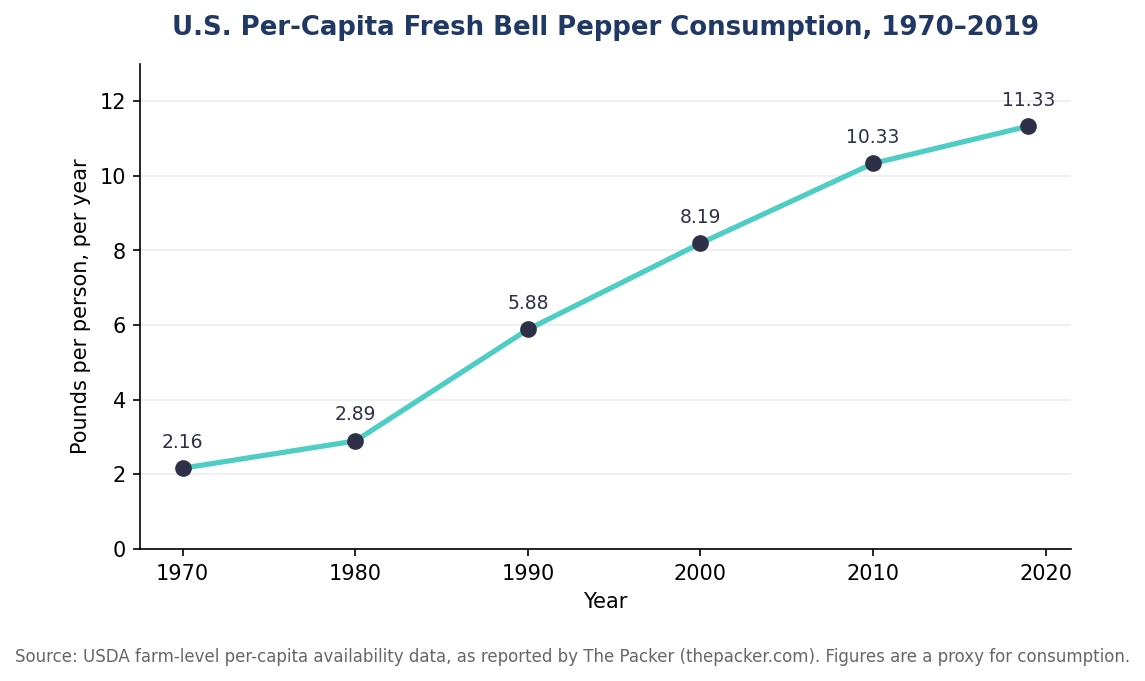
Fresh bell peppers have seen one of the steadiest long-term consumption increases of any vegetable in the US. USDA farm-level availability data shows per-capita consumption climbing more or less continuously for five decades, and that growth accelerated as smaller, snack-oriented formats entered the market.
U.S. per-capita fresh bell pepper consumption has grown roughly fivefold since 1970, based on USDA availability data reported by The Packer.
What makes a mini pepper “seedless”?
Unlike a bell pepper that’s simply small for its type, a seedless mini pepper is bred to set fruit without developing a seed cavity at all. This comes from a breeding trait called parthenocarpy combined with male sterility, which together let the plant produce full, symmetrical fruit without fertilization. The practical result for a shopper is a pepper you can eat whole, straight from the bag, without the chore of halving, deseeding, and rinsing.
Are seedless mini peppers seasonal?
Because seedless varieties, including small formats like the mini-Kapia pepper format, are typically grown in greenhouse and controlled environments as well as in the field, supply tends to be more consistent year-round than for open-field-only crops. That consistency is part of what has made the category attractive to retailers looking for a reliable snacking SKU rather than a short-season specialty item.
Nutritional profile of snacking peppers
Sweet peppers, mini and full-size alike, are a genuinely strong source of vitamin C, and the amount varies meaningfully by color as the fruit ripens. USDA nutrition data for sweet peppers shows red peppers carrying substantially more vitamin C than green ones of the same type, since vitamin C content rises as the fruit matures from green to red.
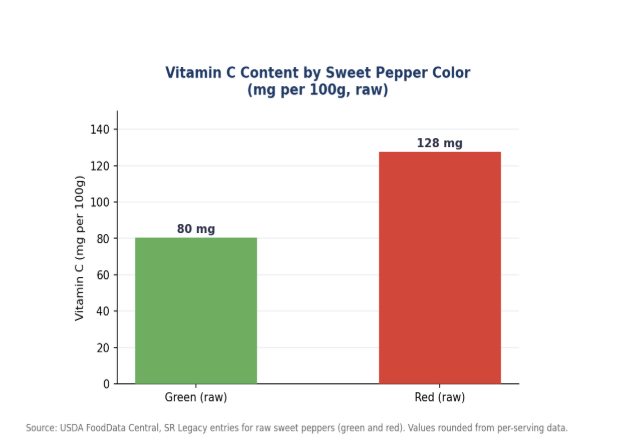
Red sweet peppers contain roughly 50% more vitamin C than green ones of the same type, per USDA FoodData Central entries.
What is driving retailers to expand this category?
Retail category managers have historically treated bell peppers as a cooking ingredient rather than a standalone snack. The rise of seedless mini formats has shifted that positioning, since a small, no-prep pepper competes more directly with baby carrots, grape tomatoes, and other grab-and-go produce than with a full-size bell pepper destined for a stir-fry. That repositioning matters commercially because snacking-category produce items tend to carry different margins and shelf placement than cooking-ingredient vegetables, giving retailers an incentive to expand shelf space for the format as consumer awareness grows.
How are seedless mini peppers typically packaged?
Because the appeal of the category rests heavily on convenience, packaging tends to emphasize grab-and-go formats: resealable bags, multi-color mixed packs, and single-serving portions aimed at lunchboxes and snack trays. This is a notable departure from how bell peppers have traditionally been merchandised, typically loose or in simple mesh bags sold by weight. The format shift reflects a broader pattern in produce retail, where smaller, pre-portioned packaging has expanded across categories like snacking tomatoes and baby cucumbers as well.
What should shoppers know before buying seedless mini peppers?
Color is a reasonably reliable guide to ripeness and flavor profile in sweet peppers generally: green peppers are harvested earlier in the ripening cycle and carry a slightly more vegetal, less sweet flavor, while red, orange, and yellow peppers are allowed to fully ripen and tend to taste sweeter. This holds true across both seeded and seedless formats. Shoppers looking for the sweetest possible snacking experience typically do better selecting fully colored red, orange, or yellow mini peppers rather than green ones, regardless of which specific variety or brand is on the shelf.
How does this format fit into a broader healthy-snacking shift?
The growth of seedless mini peppers has tracked alongside a broader retail shift toward convenient, whole-food snacking options, as shoppers look for alternatives to processed snack foods that still fit into an on-the-go lifestyle. Sweet peppers compete in that space against other low-prep produce like snap peas, baby carrots, and grape tomatoes, all of which share the same basic value proposition: little to no preparation required, and a favorable nutrition profile relative to packaged snack alternatives. Because sweet peppers carry meaningfully more vitamin C per serving than most of those competing snack vegetables, the category has a genuine nutritional argument to make alongside its convenience story.
For school lunch programs and workplace wellness initiatives specifically, the appeal of a seedless format is amplified by practical logistics: no knives or cutting boards are needed to portion a mini pepper for a lunchbox, which matters in settings where food preparation time and equipment are both constrained. That practical fit has helped seedless mini peppers gain traction in institutional foodservice channels alongside traditional grocery retail.
Frequently Asked Questions
Do seedless mini peppers need to be refrigerated?
Yes, like most fresh sweet peppers, they keep best refrigerated and are typically sold and stored in the produce cooler section.
Are seedless mini peppers more expensive than regular bell peppers?
Pricing varies by retailer and season, but snack-size seedless formats are often positioned as a premium, convenience-oriented product relative to standard bell peppers.
Can seedless mini peppers be cooked, or are they only for snacking?
They can be used in cooking the same way as any sweet pepper, though their small size and lack of seed cavity make raw snacking and stuffing especially convenient uses.

What Is an Industrial Cellular Router, and How Do You Choose One?

System in Package vs. SoC vs. MCM: Choosing the Right Integration Approach
Tomato Breeders and the Push Toward Innovative Specialty Varieties

-

 Business Solutions2 years ago
Live Video Broadcasting with Bonded Transmission Technology
-

 Business Solutions1 year ago
The Future of Healthcare SMS and RCS Messaging
-

 Business Solutions2 years ago
2-Way Texting Solutions from Company Message Services
-

 Business Solutions2 years ago
Communication with Analog to Fiber Converters & RF Link Budgets
-

 DSRC Communication2 years ago
The Crossroads of Connectivity: DSRC vs. C-V2X Technologies in Automotive Communication
-

 Business Solutions2 years ago
Wholesale SMS Platforms with OTP Services
-

 Business Solutions2 years ago
Choosing the Right B2B Digital Marketing Agency: A Guide
-

 3D Technology2 years ago
How Multispectral Cameras Advance Book Scanning