Tech
Power BI Security: How Exposed PowerBI Reports Leak Sensitive Data

Key Takeaways
|
What is the Power BI data exposure issue, exactly?
Every Power BI report is built on top of a semantic model, which represents all the data that could be used for visualization, while the report itself defines which data actually becomes visible in the interface and how. The problem is that when a report is shared, whether explicitly or implicitly by sharing the workspace it lives in, the entire underlying semantic model becomes accessible too, not just the parts a viewer can see on screen. That includes detailed records behind aggregated numbers, tables marked “hidden” in the model, non-displayed columns of visible tables, and detailed records that a report’s own filters were supposed to exclude.
Why does hiding a table or column in Power BI not actually secure it?
This is the part that catches most report owners off guard. Kanopy Security’s research into this exposure found that Power BI’s query API doesn’t check whether a table or column has been marked hidden before returning it; a user can request the name of a hidden “secrets” table, or ask for a column excluded from every visual, and the underlying query engine will return it anyway, as long as that table or column exists somewhere in the semantic model the report is built on. The behavior affects reports shared internally within an organization just as much as reports published openly to the web.
How large is the publicly exposed PowerBI surface, really?
Because so many organizations publish Power BI reports to the open web for legitimate reasons, sharing dashboards with customers, partners, or the public, that publishing habit alone creates a large attack surface once this exposure issue is factored in. A simple search engine query targeting Power BI’s public report URL pattern returns well over 160,000 results, and narrowing that query toward a specific business topic, such as adding a keyword like “sales”, can still return tens of thousands of more targeted matches.
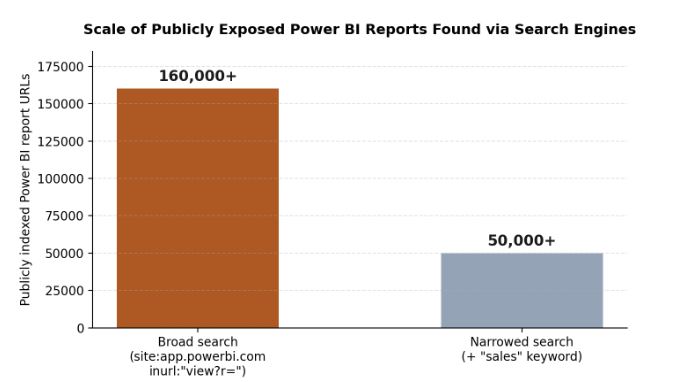

Publicly indexed Power BI report URLs found via a broad search engine query versus a topic-narrowed query.
Not every one of those results is exploitable, plenty are sample reports created by consultants or service providers to demonstrate their own skills. But manual review of even a small, randomly sampled subset of real organizational reports turns up genuine examples: state government sites unintentionally exposing protected health information, universities exposing employee data, and municipalities exposing personally identifiable information, all through reports their owners likely assumed were safely aggregated or filtered.
Does Microsoft consider this a vulnerability?
No, and that distinction matters for how organizations need to respond. Microsoft was notified through its official vulnerability disclosure channel and confirmed the behavior within two days, but classified it as a feature rather than a vulnerability, which independent reporting on the issue also noted at the time, describing how Microsoft’s stance leaves report owners themselves responsible for configuring semantic models securely, since no patch addressing the underlying behavior should be expected.
How does the exploit actually work, technically?
Running a Power BI report requires an API call that fetches the data to be displayed, a request sent to one of Power BI’s query endpoints depending on whether the report is public or restricted to an organization. The request payload is a query, in Power BI’s own proprietary format, specifying which columns and tables to retrieve, and the response returns that data as JSON. Because the query API doesn’t check whether a requested column or table is marked hidden in the semantic model, a user can simply ask for a hidden table by name and receive its contents. A separate API call, used internally to help generate the report itself, can also be used to enumerate the entire semantic model’s schema, including hidden tables and columns, giving anyone who wants to explore a report’s underlying data a roadmap for exactly what to ask for.
What kinds of organizations have been found exposed?
Manual review of a sample of publicly indexed reports turned up real examples across very different sectors, which underscores that this isn’t a niche risk limited to one industry:
- State government sites, unintentionally exposing protected health information (PHI) through reports meant to share only aggregate public health statistics.
- Universities, exposing employee data through reports intended to show only summarized institutional metrics.
- Municipalities, exposing personally identifiable information (PII) through reports built to share only anonymized community data.
- Commercial organizations, sharing what they believed were safely filtered sales, financial, or operational dashboards with partners or the public.
In each case, the organizations involved almost certainly believed their reports were safe to share, since the visible dashboard showed only the aggregated or filtered view they intended. The underlying semantic model told a different story.
What actually needs to change to fix exposed PowerBI reports?
| Common mistake | What to do instead |
|---|---|
| Marking a table or column “hidden” in the model | Remove it from the semantic model entirely rather than relying on the hidden flag, which the query API ignores. |
| Filtering sensitive rows only in the report’s visuals | Restrict the data source itself using a Power Query expression, so filtered rows are never part of the semantic model to begin with. |
| Aggregating sensitive columns only in the display | Aggregate the data at the data source level, or exclude sensitive columns from the semantic model before it reaches the report. |
| Assuming a one-time review is sufficient | Audit Power BI environments regularly for reports that were published to the web unintentionally or overshared internally. |
How can an organization check its own exposure?
Because this isn’t a bug that gets patched centrally, checking exposure has to happen at the organization level. Kanopy Security’s data leakage prevention capability continuously monitors data usage patterns across business-built platforms, including Power BI, surfacing risky sharing configurations and unexpected data movement as they happen rather than waiting for a periodic audit to catch them. For a quicker, self-directed first check, Kanopy also released the Power BI Analyzer, a free, open source scanning tool that reviews an organization’s Power BI environment for reports published to the web or widely shared internally, then flags any that carry more underlying data than the report actually displays.
- Start with reports published to the web, since they carry the highest exposure risk to anyone who finds the URL.
- Check for hidden tables and columns specifically, since “hidden” in Power BI’s UI does not mean inaccessible through its API.
- Review widely shared internal reports too, since the same exposure applies to anyone with access to the workspace, not just the public web.
- Repeat the audit on a schedule, since new reports get published continuously and a one-time review goes stale quickly.
Frequently Asked Questions
What is the Power BI data leakage vulnerability that Kanopy Security discovered?
A flaw in how Power BI reports work: every report runs on a semantic model holding all the underlying data, but when a report is shared or published to the web, the entire semantic model, including hidden tables, hidden columns, and filtered-out records, stays accessible through Power BI’s own query API, even though none of it appears in the visible report.
Does Microsoft consider the Power BI data exposure a vulnerability?
No. Kanopy reported the issue to the Microsoft Security Response Center on May 16, 2024, and Microsoft confirmed the behavior two days later, on May 18, 2024, but classified it as a feature, not a vulnerability. That means no fix is coming, and it falls to report owners to configure their semantic models securely.
How can an organization check if its Power BI reports are exposing hidden data?
Kanopy Security built and open-sourced a free tool, the Power BI Analyzer, which scans an organization’s Power BI environment for reports published to the web or widely shared internally, then flags any that carry more underlying data than what the report actually shows.
How can I stop my Power BI reports from leaking hidden data?
Remove hidden tables and columns from the semantic model entirely rather than just hiding them, use Power Query expressions to restrict the data source to only the subset that should be shared, and make sure aggregated views pull only from non-sensitive columns. Audit Power BI environments regularly for reports published to the web by accident.