Streaming Solutions
How to Choose a 4K Video Encoder: Codecs, Latency and Hardware Trade-Offs

| Key Takeaways
• A 4K encoder compresses ultra high definition video, which has four times the resolution of Full HD, into a stream small enough to travel over a network. • BBC R&D testing found that HEVC (H.265) can cut the bitrate needed for UHD video by up to 50 percent compared with H.264 at comparable quality. • In a 2025 Waseda University study, hardware encoders generally held end-to-end latency to 200 milliseconds or less, while most software configurations added 41 to 100 frames. • The right 4K encoder depends on the latency target, codec support, input interfaces, bitrate budget and power limits of the deployment. |
What does a 4K encoder actually do?
A 4K encoder converts raw ultra high definition video into a compressed stream, using a codec such as H.264 or H.265, so that the video can be sent over an IP network or stored without overwhelming the available bandwidth. The need is simple arithmetic. 4K UHD quadruples the resolution of Full HD, and researchers at Waseda University note that uncompressed video exceeds the capacity of typical household internet connections. Compression is therefore unavoidable, but it is computationally intensive, which creates a three-way trade-off between data rate, picture quality and end-to-end latency. For a closer look at the codec side of that trade-off, this walkthrough of how 4K encoding handles codecs and practical deployments is a useful companion, and a short glossary definition of paired 4K encoder and decoder technology covers the basic terminology.
How much bandwidth does HEVC save compared with H.264?
HEVC (H.265) can cut the bitrate needed for UHD video by up to 50 percent compared with H.264 at comparable quality, according to testing by the BBC R&D video coding team. That team found an average saving of 44 percent when judged with objective quality metrics and 59 percent when viewers judged the picture, which suggests the real-world benefit can be larger than the numbers produced by automated measurements. The savings explain why HEVC is so widely used for 4K delivery. Commercial UHD services in Japan and South Korea deliver 4K over HEVC at roughly 25 and 29 megabits per second, and YouTube’s 4K VP9 transcodes in the same Waseda dataset averaged 29.5 megabits per second, with a range of 9.46 to 50.9. Those figures are a useful reality check when sizing a link for a 4K stream.
The efficiency has a cost on the encoding side. One industry comparison notes that HEVC can require up to ten times the processing power of H.264 to encode at the same speed, which is the reason encoder choice matters more at 4K than at 1080p. A fuller breakdown of the BBC findings is available in this report on the BBC R&D bitrate tests.
Does a hardware or software 4K encoder add less delay?
Hardware encoders add far less delay than software encoders in live 4K work. In a 2025 evaluation of GPU encoders by Waseda University researchers, hardware encoders generally kept end-to-end latency at or below 12 frames, or about 200 milliseconds, even with normal-latency tuning, while most software configurations added between 41 and 100 frames. The best result was 5 frames, or 83 milliseconds, from an Intel encoder using its ultra-low-latency mode for H.265 and AV1. The full methodology and results are published in the Waseda University paper on low-latency 4K GPU encoding.
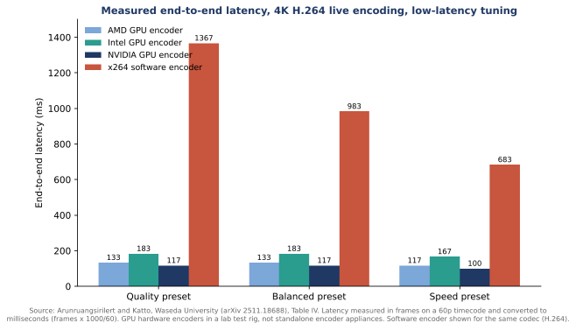

Two details from the study are worth noting. First, quality presets barely changed hardware latency, usually by a single frame, so buyers can choose a higher-quality preset without a large delay penalty. Second, one software tuning mode, the zero-latency tune of the x264 H.264 encoder, reached 7 frames, which shows that software latency is heavily dependent on configuration. The study also reports that some software configurations could not run in real time at all, and that one NVIDIA configuration forced two-pass encoding that pushed latency to 37 frames. Latency depends on settings as much as on the silicon.
What are the trade-offs between hardware, software and GPU-based encoders?
Hardware encoders favor consistency and low CPU load, software encoders favor flexibility and compression quality, and GPU-based encoders sit between the two by placing a dedicated encoding block inside a graphics card. The practical differences are summarized below.
| Approach | Where encoding runs | Main strength | Main limitation |
| Dedicated hardware | Purpose-built chip, GPU block or ASIC | Low, consistent latency and low CPU load | Fixed to the ports and codecs it shipped with |
| Software | General-purpose CPU | Best compression given enough time, newest codecs, full configurability | High CPU use and, in the Waseda tests, much higher latency |
| GPU-accelerated | Encoding block inside a graphics card | Offloads the CPU, supports H.264, H.265 and AV1 | Behavior varies by vendor and generation, including compatibility quirks |
The compatibility point comes from the Waseda study, which found that Intel’s H.265 encoder used a unidirectional B-frame structure that could not be disabled and may affect playback on some devices. Embedded encoders show the hardware approach at the smallest scale. Jupiter Nano, for example, is described by Maris-Tech as a dual-channel H.264 and H.265 video encoder specified for 100 millisecond ultra-low latency streaming in tactical missions.
Does resolution alone define a 4K workflow?
Resolution alone does not define a 4K workflow, because frame rate, dynamic range and color also change what an encoder must handle. An AVIXA guide to 4K streaming encoders points out that frame rate is critical in applications such as sports broadcasts and competitive video games, where 30 or 60 frames per second can give way to 120. A trade-press discussion of 4K encoding makes the same point from the broadcast side, asking whether 4K also implies high dynamic range, a wider color gamut or a higher frame rate. The Waseda tests used 4K sequences at 59.94 frames per second, which is a reminder that a 4K stream at 60 frames per second is a much heavier job than the same resolution at 30.
Standards history helps here as well. H.265 was approved by the International Telecommunication Union in January 2013, and a Grass Valley product marketing manager quoted in that discussion describes HEVC as the only practical way to deliver 4K UHD to the home. For live studio and truck applications the same executive points to TICO compression, which is described as fast and lightweight, with only a few lines of delay. The right codec therefore depends on whether the destination is a consumer screen or another piece of production equipment.
What should buyers check before choosing a 4K encoder?
Buyers should confirm five things before choosing a 4K encoder, because each one can rule out a product regardless of its headline specifications. The list below reflects the findings discussed above.
- Latency target. Decide whether the requirement is a few seconds for broadcast or a fraction of a second for interactive or operational use, and check whether quoted latency covers the encoder alone or the whole chain.
- Codec support. 265 saves bandwidth at 4K, but it demands more encoding power and newer decoding hardware, so confirm what the receiving side can play.
- Bitrate budget. Plan around real 4K service figures, such as the 25 to 29 megabits per second used by commercial UHD services, rather than 1080p assumptions.
- Inputs and flexibility. A hardware appliance supports the input ports and codecs it shipped with, so adding a future codec may mean new silicon rather than a software update.
- Power and thermal limits. Software encoding consumes significant computing power and energy, which the Waseda authors describe as impractical for battery-operated devices.
Rate control and keyframe settings also deserve attention. The Waseda tests followed live-streaming platform guidance by using constant bitrate and a two-second group of pictures, a sensible baseline when the destination is a streaming service.
Frequently Asked Questions
Is H.265 better than H.264 for 4K video?
For 4K video, H.265 is generally more efficient, because BBC R&D testing found bitrate savings of up to 50 percent for UHD content at comparable quality. The trade-off is higher encoding complexity and the need for devices that can decode H.265.
What bitrate does a 4K stream need?
Commercial 4K services in Japan and South Korea deliver HEVC video at roughly 25 and 29 megabits per second, and YouTube’s 4K VP9 transcodes averaged 29.5 megabits per second in one research dataset. The right figure depends on codec, content and quality target.
Do hardware encoders have lower latency than software encoders?
In a 2025 Waseda University evaluation, hardware encoders generally stayed at or below 200 milliseconds end to end, while most software configurations added between roughly 680 and 1,670 milliseconds. Results depend heavily on tuning and settings.
Can a software encoder handle live 4K video?
Sometimes, but not reliably in every configuration. In the same evaluation, some higher-quality software settings could not encode 4K in real time on the test system, and software encoding used far more CPU power than hardware encoding.