Cybersecurity
Copilot Studio Security: How Kanopy Governs the Shadow AI Agents Hiding in Plain Sight

At a Glance
- Microsoft Copilot Studio has made it possible for any business team to build and deploy AI agents in days – without involving IT or security. The result is a rapidly growing population of shadow AI agents operating inside enterprise environments with real permissions, real data access, and zero security oversight.
- Copilot Studio security is not a feature gap that Microsoft will close with a settings toggle. It is a governance problem that emerges from the platform’s fundamental design: business users can build, publish, and connect agents to sensitive data without a single security review.
- Kanopy Security provides the continuous discovery, risk assessment, and governance layer that transforms Copilot Studio’s business-built agents from an ungoverned liability into a managed, secured asset class.
The pace at which Microsoft Copilot Studio agents are being created inside enterprise environments has outrun every reasonable security team’s capacity to keep up. A customer service team builds an agent connected to Dynamics 365. A finance team deploys an agent with access to SharePoint and Power BI. An HR team publishes an agent that can query sensitive employee data. None of these agents went through a security review. None of them were inventoried. And in most organisations, nobody in the security team even knows they exist. That is the copilot studio security problem — and it is growing faster than any manual governance process can address.

Why Copilot Studio Creates a Shadow AI Security Problem
Shadow AI security has typically referred to employees using unsanctioned public AI tools – ChatGPT, Claude, Gemini – without organisational oversight. Copilot Studio creates a more complex variant of the same problem: shadow AI that operates with enterprise identities, enterprise permissions, and enterprise data, built by people who had no security training when they built it.
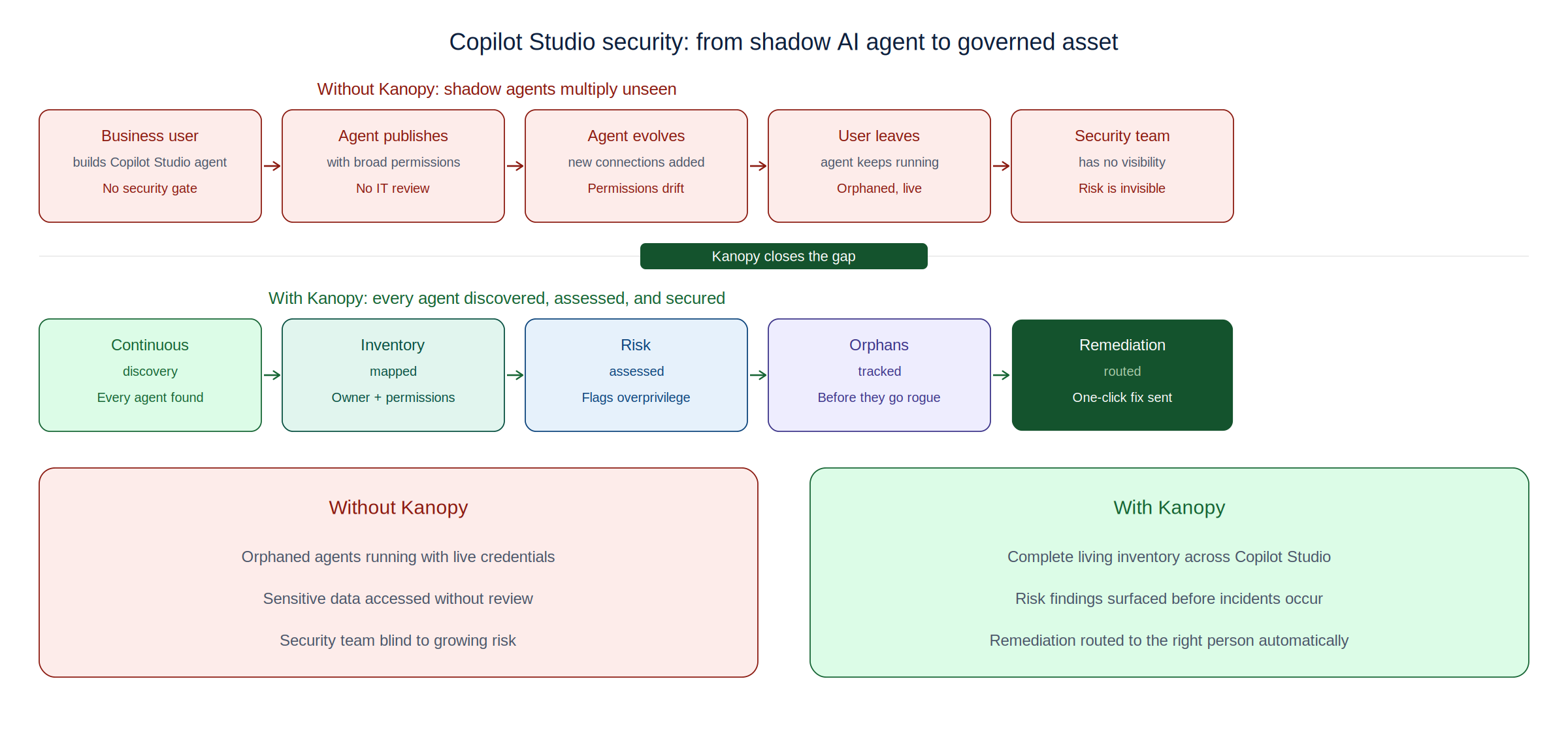
Business teams building Copilot Studio agents face no mandatory security checkpoint. The platform’s citizen developer model – which is genuinely powerful for productivity – does not include a security review gate before an agent is published and begins operating. Agents are frequently granted broad permissions to avoid breaking workflows. Once deployed, they can act automatically, pulling data from SharePoint, OneDrive, Dataverse, or connected SaaS applications and surfacing or transmitting it in ways that were never reviewed for data governance compliance.
Orphaned agents compound the problem. When the team member who built an agent leaves or moves to a different role, the agent continues operating – often with the original creator’s access credentials or a service principal that was never reviewed for appropriate scope. Kanopy’s research across enterprise Microsoft 365 environments consistently finds that a significant proportion of Copilot Studio agents are orphaned, overprivileged, or connected to data sources that their owners did not intend to expose.
What Kanopy Provides for Copilot Studio Security
Kanopy’s Copilot Studio security capability begins with discovery – and in most organisations, the discovery results alone are significant. Kanopy builds a living inventory of every Copilot Studio agent in the environment: who built it, when it was last active, what data connections it has, what permissions it operates with, and whether it has been published externally. Many security teams, upon seeing this inventory for the first time, discover agents they did not know existed and data connections they would not have approved.
From inventory, Kanopy moves to continuous risk assessment. Each agent is evaluated against a defined risk profile: overprivileged access, connections to sensitive data categories, absence of appropriate authentication controls, orphaned ownership, and published channels that expose the agent beyond its intended scope. Risk findings are surfaced with the context that makes them actionable – not just a vulnerability score but an explanation of what the risk means and what remediation looks like.
Remediation in Kanopy is designed for the operational reality of enterprise environments: one-click remediation for common issues that routes fixes to the appropriate business user, and detailed guidance for security team action on higher-complexity findings. The goal is not to give security teams more alerts to manage – it is to close the gap between identifying a risk in a Copilot Studio agent and actually reducing it. Explore Kanopy’s full Copilot Studio security capability at the Kanopy Copilot Studio Security page, and discover how shadow AI security across the full enterprise AI estate is addressed at kanopysecurity.com.
Frequently Asked Questions
Q1: What makes Copilot Studio security different from securing other enterprise applications?
A: Copilot Studio agents are built by business users without security training, operate autonomously with enterprise permissions, and can act on data in real time. Unlike traditional applications, they have no mandatory security gate before deployment, can be created and modified rapidly, and may accumulate permissions over time without review. This makes continuous, automated governance essential rather than periodic manual review.
Q2: Why is shadow AI security a concern specifically for Copilot Studio environments?
A: Copilot Studio enables business teams to create and deploy AI agents without IT or security involvement. These agents operate with real enterprise credentials and access real data – but because they are built outside formal software development processes, they typically receive no security review. This creates shadow AI: autonomous systems operating inside the enterprise with unknown risk profiles.
Q3: Does Microsoft’s native Copilot Studio governance cover the security risks Kanopy addresses?
A: Microsoft’s native controls – Power Platform Admin Center, Purview DLP, data policies – provide important baseline governance but are not designed to continuously discover every agent, assess risk at the agent level, track orphaned agents, or provide the actionable remediation workflow that enterprise security teams need. Kanopy operates as a dedicated security layer on top of Microsoft’s native controls.
Q4: How does Kanopy discover Copilot Studio agents that weren’t formally registered or inventoried?
A: Kanopy connects directly to the Microsoft 365 and Power Platform ecosystem, automatically discovering every Copilot Studio agent regardless of whether it was formally inventoried. The discovery process surfaces agents that security teams did not know existed, maps their data connections and permissions, and identifies orphaned agents that have lost active ownership.
Q5: Can Kanopy remediate Copilot Studio security issues automatically?
A: Kanopy provides one-click remediation for common security issues — over-broad permissions, missing authentication controls, exposed publishing channels – that routes appropriate fixes to business users or security teams depending on the complexity of the issue. For higher-severity findings, Kanopy provides detailed remediation guidance that security teams can action directly.