Tech
The 6 Best Practices for Securing Enterprise AI Copilots

Enterprise AI copilots and automation assistants now sit inside email, CRM systems, ITSM platforms, and office productivity suites, each with its own defaults and its own blind spots. The six practices below apply across that whole category, regardless of which specific copilot or automation platform an organization has deployed.
1. Scope permissions before the copilot ever touches production data
Default permission scopes on most enterprise copilots are broader than the actual task requires. Reviewing and narrowing Copilot Studio security controls before rollout, rather than after an incident, is consistently the highest-leverage step available.
2. Extend the same scrutiny to CRM-embedded AI features
CRM platforms have added AI agent capabilities directly into workflows that already touch customer and financial data. Reviewing Salesforce AI governance settings with the same rigor applied to a standalone AI deployment closes a gap that is easy to overlook simply because the AI feature lives inside a familiar, already-trusted system.
3. Apply consistent audit logging across every AI-enabled platform
Audit logging that only covers some AI-enabled platforms creates blind spots at exactly the boundary attackers look for. Extending consistent logging to ServiceNow AI governance workflows, alongside better-monitored platforms, keeps the audit trail continuous rather than fragmented by system.
4. Don’t treat RPA-driven agents as a separate, lower-priority category
Automation platforms built for citizen developers often run with elevated service-account permissions by default. Applying the same review standard to UiPath security for citizen developers that gets applied to newer generative AI deployments avoids a gap that opens simply because the technology predates the current AI security conversation.
5. Validate inputs the copilot processes, not just the copilot’s own configuration
A well-configured copilot can still be manipulated through the documents, emails, or tickets it is asked to summarize or act on. Input validation needs to account for instructions embedded inside that content, not just the copilot’s own settings.
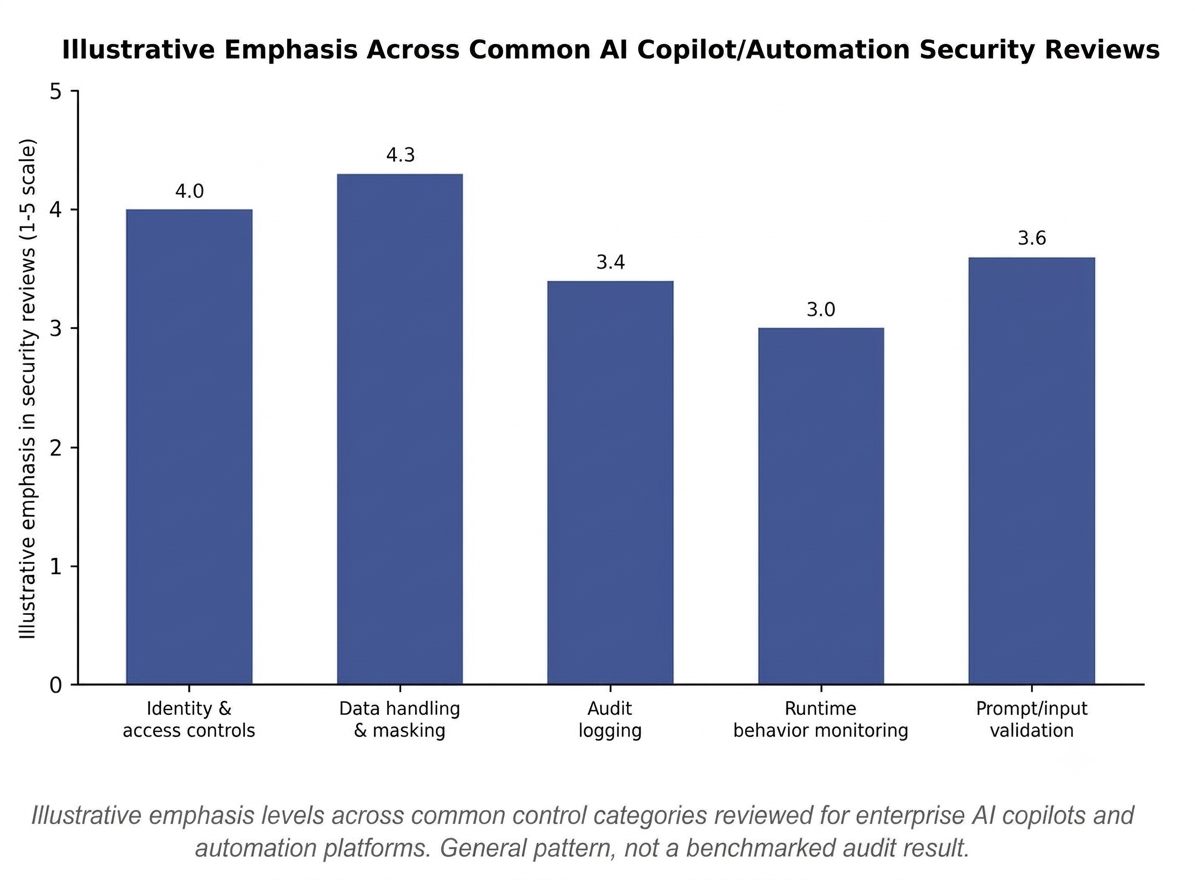
This distinction matters because most security reviews stop at configuration. They confirm the copilot has the right permission scope and the right access controls, then treat the review as complete. That leaves the content the copilot processes every day almost entirely unexamined, even though it is the most common path an attacker actually has into the system.
6. Monitor behavior continuously rather than relying on a launch-time review
A copilot’s risk profile is not fixed at deployment. Permissions get modified, integrations get added, and underlying models get updated. Continuous monitoring is what catches drift between how the copilot was reviewed and how it is actually being used months later.
In practice, this is the control most organizations plan to add eventually and never quite prioritize, largely because launch-time review produces a clear pass or fail while ongoing monitoring requires sustained attention with no single moment of completion. That is exactly why it tends to be the gap attackers rely on most.
Illustrative emphasis levels across common control categories reviewed for enterprise AI copilots and automation platforms. General pattern, not a benchmarked audit result.
How six core security controls typically apply across different categories of enterprise AI copilots and automation tools. General guidance, not a vendor-specific audit.

| Control Category | AI Copilots in Productivity Suites | CRM-Embedded AI Agents | ITSM AI Assistants | RPA / Automation Platforms |
| Permission scoping | High priority | High priority | Medium priority | High priority |
| Audit logging depth | Often inconsistent | Improving | Often inconsistent | Frequently overlooked |
| Input validation for embedded content | Critical | Critical | Medium priority | Medium priority |
| Runtime behavior monitoring | Emerging practice | Emerging practice | Emerging practice | Frequently overlooked |
Where This Leaves Security Teams
None of these six practices is unique to a single vendor or platform category. What varies is how consistently each one gets applied once an organization has more than one type of AI copilot or automation tool in production. Treating all of them, generative copilots and older RPA platforms alike, against the same six-practice baseline tends to close the gaps that show up when one category gets more security attention than another simply because it is newer or more visible.
Frequently Asked Questions
Are RPA platforms less risky than generative AI copilots?
Not inherently. RPA and automation platforms often run with elevated service-account permissions and can be overlooked in security reviews simply because they predate the current wave of generative AI tools, which can leave real gaps if they are treated as lower priority.
What is the most overlooked security control for enterprise AI copilots?
Runtime behavior monitoring is commonly the most overlooked, since most security reviews still focus on configuration at launch rather than ongoing behavior after the copilot has been in use for a while.
Do CRM-embedded AI agents need a separate security review from standalone AI tools?
Yes, in practice they often need dedicated attention because they are embedded inside a system that is already trusted and already touches customer and financial data, which can make new AI features an afterthought in the review process.